Best Habit Tracker Apps in 2027 (Free, iPhone, Android)
Ten habit tracker apps compared on free plans, prices, platforms and widgets, plus what the research says makes a habit tracker actually work.
The best habit tracker app depends on where you live digitally. On Apple devices only, Streaks is the best one-time purchase. Across Android, Windows and the web, Habitify covers the most platforms. Loop is the best free tracker on Android, HabitKit the best free grid on iPhone. If your habits serve bigger goals, Plannedo ties each one to its goal and your day.
Most habit trackers look alike in the screenshots. They differ in three things that matter more than the icons: how they treat a missed day, what you can see after six months, and whether the habit is connected to anything you care about. That’s what this comparison looks at.
A note on bias: we build Plannedo, so it comes first, and you should weigh that. For every other app, prices, platforms and features come from its US App Store or Google Play listing and the developer’s own site, checked on October 25, 2026. App Store pages list every price point a developer has registered, including offers, so where the developer publishes a standard price, that’s the one given here.
The short list
| App | Runs on | Price (US) | Free plan | Widgets |
|---|---|---|---|---|
| Plannedo | Web, iPhone, Mac | $7.99/mo or about $79/yr | 3 habits | iPhone, Mac |
| Streaks | iPhone, iPad, Mac, Watch | $5.99 once | Paid app, 24 tasks | Home, Lock Screen, Watch |
| Habitify | Apple, Android, Windows, web | $8.99/mo, $49.99/yr or $119.99 once | 3 habits | Home, Lock Screen, Watch |
| HabitKit | iPhone, Android | Monthly, yearly or lifetime | 4 habits | Home, Pro only |
| TickTick | Apple, Android, Windows, web | $49.99/yr | 5 habits | Home, StandBy, Watch |
| Loop | Android | Free, open source | Everything | Home |
| Way of Life | iPhone, Android | $29.99 | Limited | Yes |
| Atoms | iPhone, Watch, Android | $4.99/mo or $39.99/yr | Limited | Yes |
| Habitica | iPhone, iPad, Android, web | Free, optional subscription | Everything | Yes |
| Finch | iPhone, iPad, Android | Free, Plus $69.99/yr | Core features | Yes |
What makes a habit tracker actually work
Three findings are worth more than any feature list.
Seeing your progress helps, especially on the record. Benjamin Harkin, Thomas Webb and colleagues pulled together 138 experiments with 19,951 participants in which people were randomly assigned to monitor their progress toward a goal or not. Monitoring made people more likely to reach their goals, and the effect was larger when progress was physically recorded or reported to others. A habit tracker is a monitoring tool; the history view is the part doing the work.
How the app treats a broken streak matters. In seven studies, Jackie Silverman and Alixandra Barasch found that people keep going more when their log shows an intact streak than a broken one, even with the same actual behavior. The drop after a break was bigger when people blamed themselves, and smaller when they could repair the streak. So look at what happens on a missed day: a skip, a rest day, a two-day rule or a way to fix a forgotten entry turns one bad Tuesday into a dent rather than a reset.
Reminders build repetition, not habits. Katarzyna Stawarz, Anna Cox and Ann Blandford ran a four-week study and reviewed 115 habit apps. Reminders helped people repeat the behavior but got in the way of it becoming a habit; cues tied to an event (“after I pour my coffee”) made it more automatic; rewards made no difference. Most apps, they found, focused on tracking and reminders. Whatever app you pick, write the cue into the habit itself: “Read 20 pages after dinner”, not just “Read”. The morning routine checklist is built the same way, around one anchor.
And expect it to take a while. In the best-known study of real-world habits, automaticity took a median of 66 days, with a wide range; more in how long it takes to form a habit.
How to choose
Which devices? Apple only: Streaks, and Plannedo (which also runs in any browser). iPhone and Android: Habitify, TickTick, HabitKit, Atoms, Way of Life, Habitica, Finch. Android only: Loop. Windows or a browser: Habitify, TickTick, Habitica, Plannedo.
Do you want to pay once? Streaks is $5.99 once. Habitify and HabitKit sell lifetime licenses. Loop and Habitica are free.
What happens on a missed day? Streaks has Skip, Vacation Mode and an optional two-day rule. Habitify has Skip and Off Mode (Pro). Loop has a skip mark that leaves the streak intact. HabitKit has no skip day; its help suggests an “N per week” goal instead.
Is the habit for something? If “run three times a week” serves “run a 10K”, it helps to see the habit and the goal together. Plannedo links habits to goals; most trackers keep them apart.
The apps
1. Plannedo: habits tied to your goals and your day
- Runs on: web, iPhone and Mac.
- Price: free for 3 habits, 1 goal with a board and unlimited tasks. Pro is $7.99 a month or about $79 a year for unlimited habits and goals.
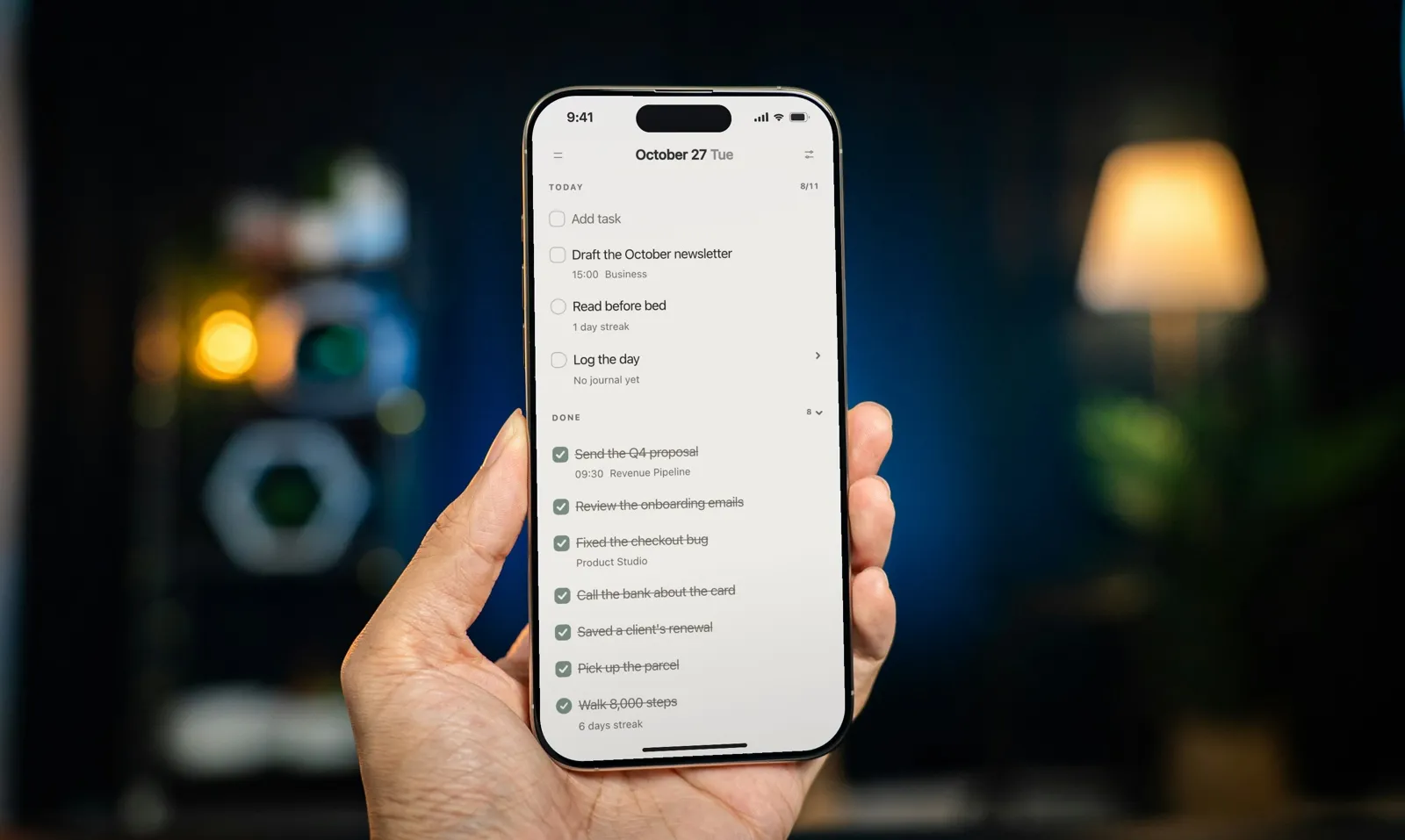
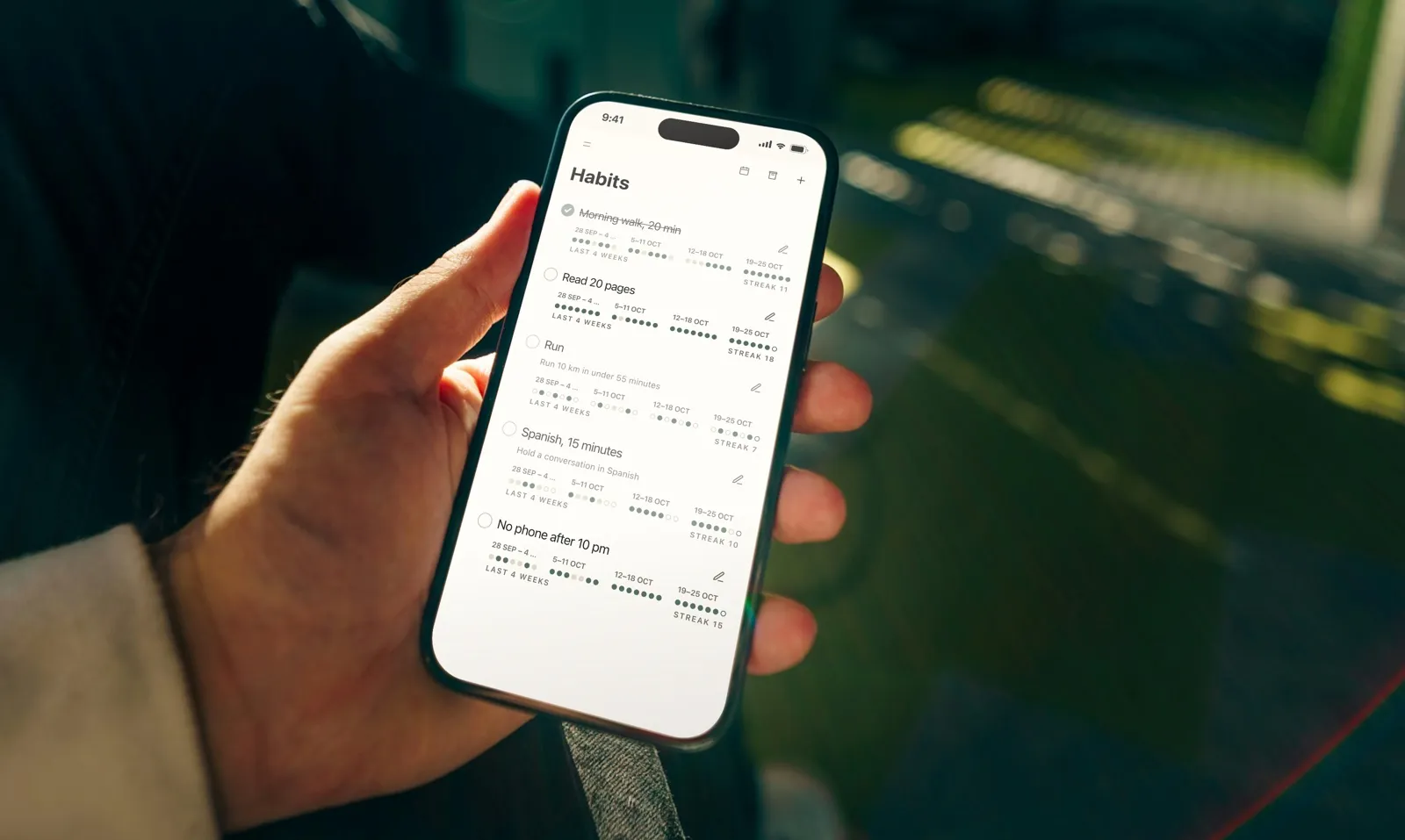
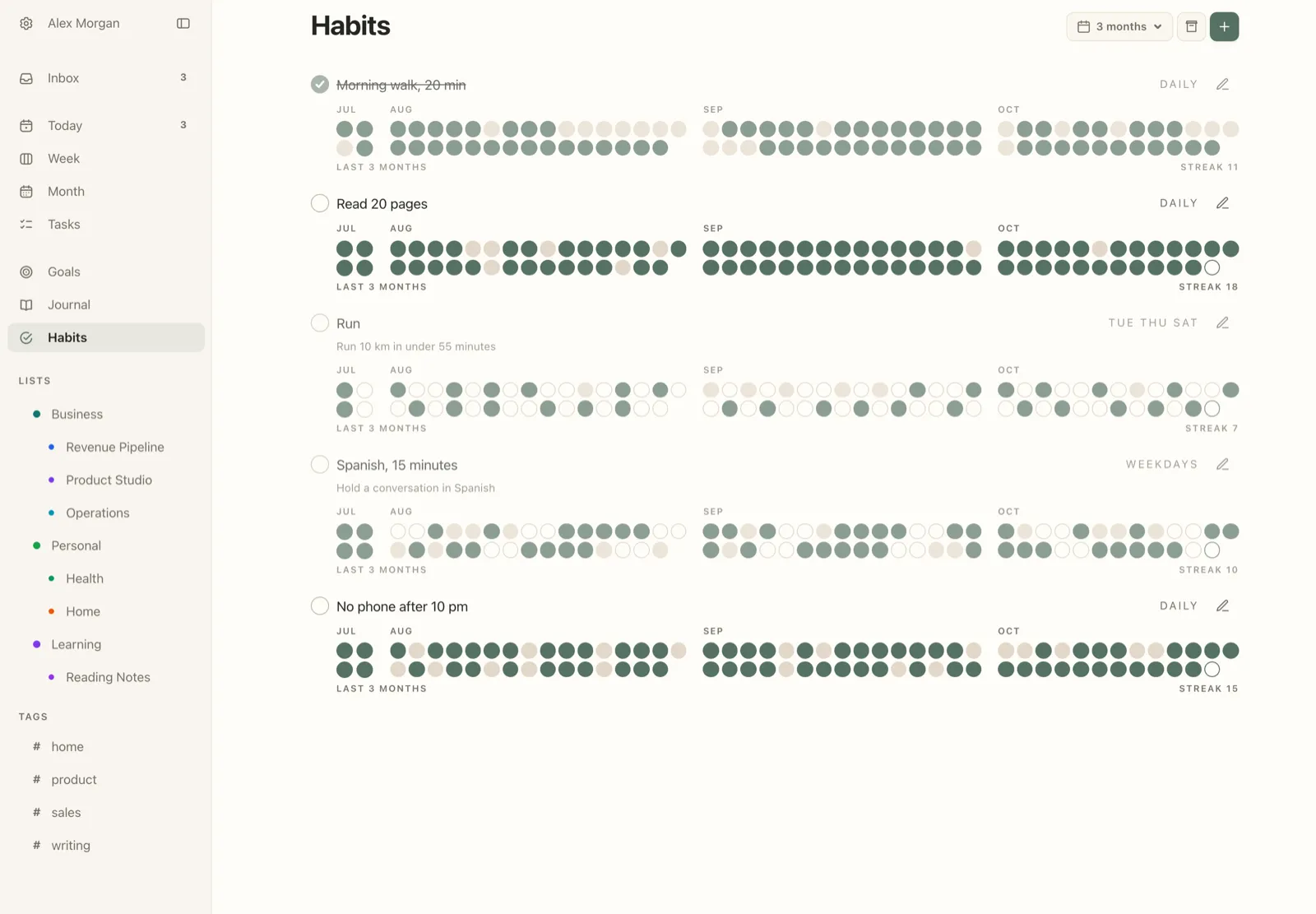
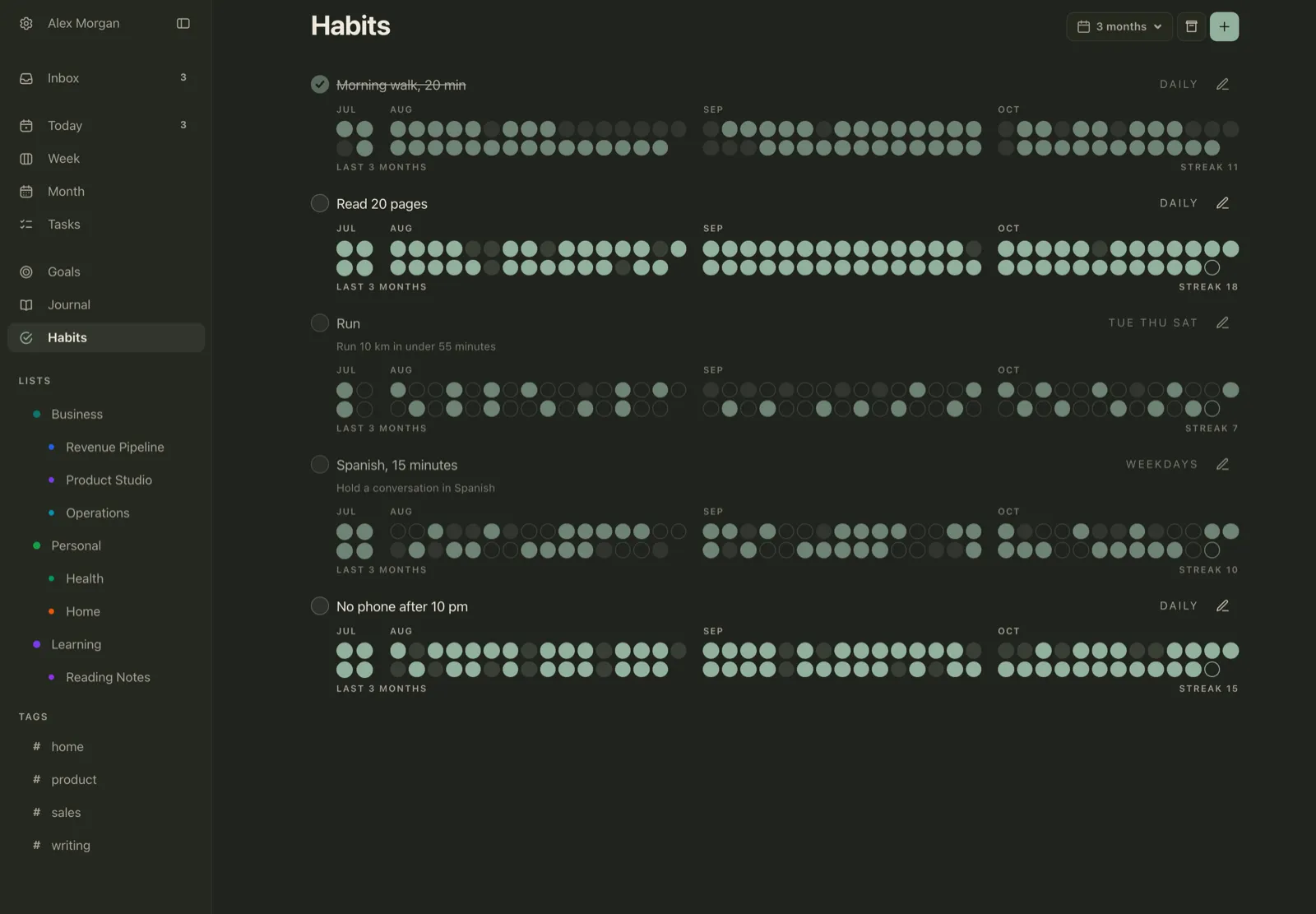
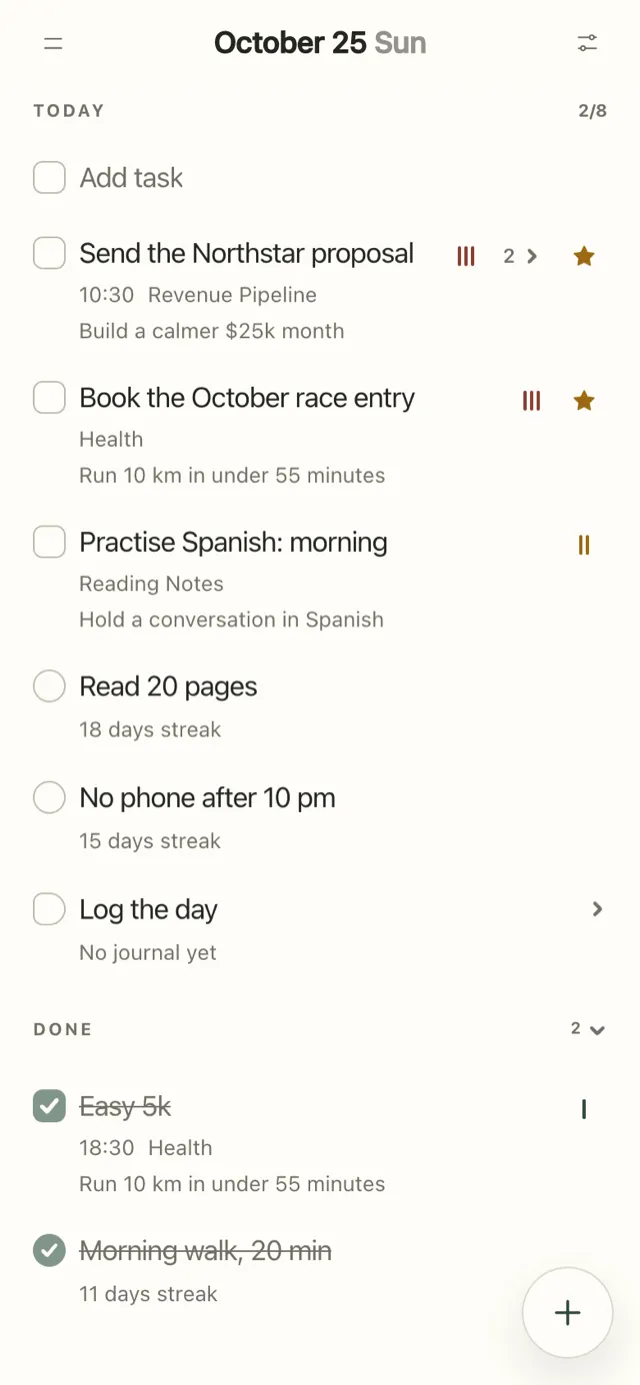
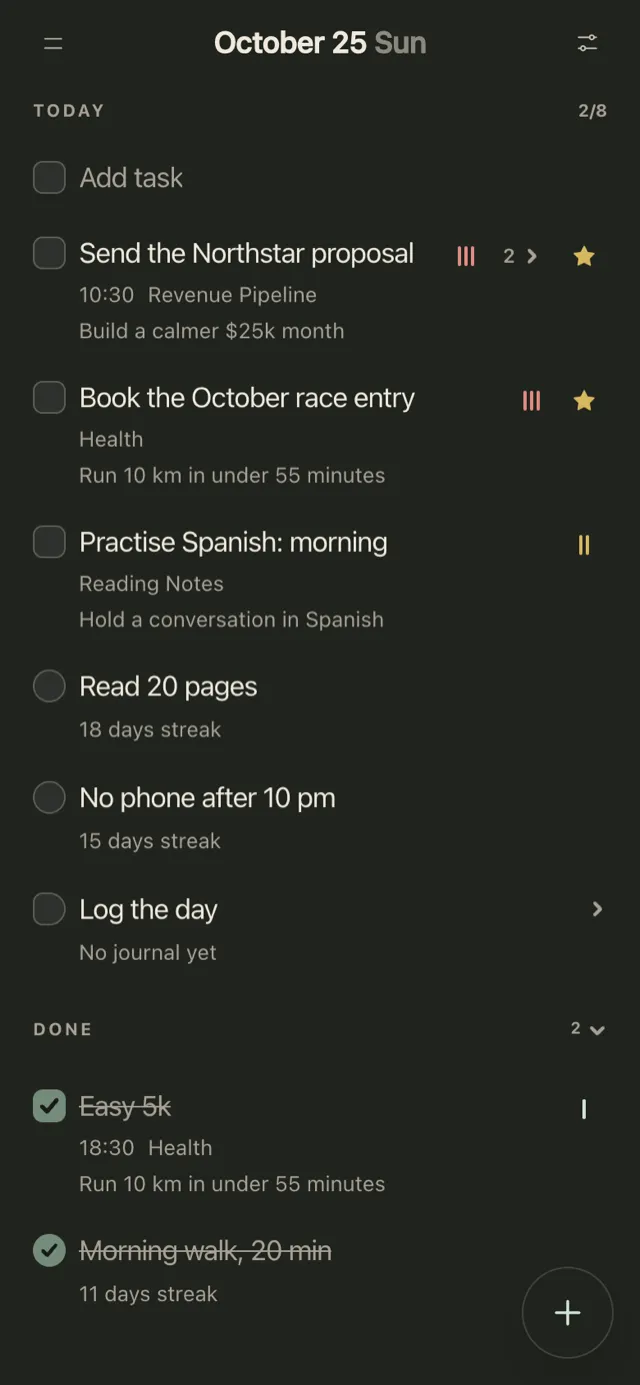
Plannedo is a planner first: Today, Week and Month for tasks, goals on visual boards, and habits on a schedule of weekdays. Each habit shows up on Today next to your tasks with its streak (“18 days streak”), and the Habits page shows its history as a grid of dots for 4 weeks, 3 months or a year. You can tick a past day straight from the grid if you forgot to log it. A habit can be linked to a goal, and its name appears under the habit, so “Run” reads as part of “Run 10 km in under 55 minutes” rather than a chore on its own. Each evening, Log the day asks whether each goal moved. There are two habit widgets on iPhone and Mac: Habits and Today & Habits.
What it doesn’t do: no Apple Watch app, no Apple Health link, no Android app (the web app works in any browser), and schedules are set by weekday rather than “three times a week”.
2. Streaks: the best one-time purchase for Apple devices
- Runs on: iPhone, iPad, Mac, Apple Vision and Apple Watch.
- Price: $5.99 once, no subscription. Up to 24 tasks.
Streaks has been on the App Store since 2015 and holds 4.8 stars from 27,354 US ratings. Tasks linked to Apple Health complete themselves: steps, water, mindful minutes, Activity rings. Schedules are flexible (specific weekdays, N days a week or month, every N days), and a missed day can be marked Skipped instead of Missed, so the streak survives. Vacation Mode and an optional two-day rule do the same for longer breaks. Widgets cover the Home Screen, Lock Screen, StandBy and every Apple Watch complication type. No account: data stays on your devices and your iCloud, and you can export to CSV.
Best for: Apple-only users who want to pay once and let Apple Health tick things off.
3. Habitify: the most platforms
- Runs on: iPhone, iPad, Mac, Apple Watch, Android, Wear OS, Windows and the web.
- Price: free for 3 habits. Pro is $8.99 a month, $49.99 a year or $119.99 once; a cheaper Plus plan ($29.99 a year) adds unlimited reminders.
If you switch between an iPhone, a Windows laptop and an Android tablet, Habitify is the one tracker that follows you everywhere. Apple Health sync is two-way, but Pro only, and it also connects to Health Connect, Strava, Fitbit and Screen Time. Skip keeps a streak alive, and Off Mode (Pro) pauses everything for a holiday. History comes as a calendar, charts and a heatmap widget of up to 216 days. Export to CSV or a full backup.
Best for: people on several platforms who are happy to subscribe for the integrations.
4. HabitKit: the best free grid on iPhone
- Runs on: iPhone and Android.
- Price: free for 4 habits. Pro is sold monthly, yearly or for life, priced per country; the US App Store lists, among other price points, $11.99 a year and $29.99 for life.
HabitKit is built around one view: a year-long grid of tiles for each habit, like a contribution graph. No account, no sign-up; data stays on your phone with daily backups, including to your own iCloud on iPhone, and you can export to JSON. Widgets, charts and more than 4 habits need Pro. There’s no skip day; the help suggests setting a weekly goal (say, five times a week) for planned days off. It holds 4.8 stars from 2,504 US ratings.
Best for: a clean, private tracker for up to four habits, free.
5. TickTick: habits inside a full task manager
- Runs on: iPhone, iPad, Mac, Apple Watch, Android, Wear OS, Windows, Linux and the web.
- Price: free for 5 habits (and 9 lists). Premium is $49.99 a year, or $4.99 a month on the App Store, and raises the limit to 299 habits.
TickTick is a to-do app with a capable habit tracker attached, and an Editors’ Choice with 4.9 stars from 46,584 US ratings. Habits can be “three times a week” or have an amount (“5 words a day”), with a monthly check-in table and a yearly heat map. Habit widgets include Today Habits, Weekly Habits and a Habit Heat Map, plus StandBy and Apple Watch. Its Apple Health feature shows Health data in the calendar view; it doesn’t complete habits.
Best for: people who want one app for tasks, calendar and habits.
6. Loop Habit Tracker: the best free option on Android
- Runs on: Android (Google Play and F-Droid).
- Price: free and open source (GPLv3), with no in-app purchases and no limit on habits.
Loop has no account, no ads and no internet requirement. Next to the streak it shows a habit score, a measure of strength that every repetition raises and every missed day lowers, so a few misses after a long run don’t wipe out your progress. Charts and the full history sit alongside. Schedules can be “3 times a week” or “every other day”, and a skip mark leaves the score and streak unchanged. Export to CSV or SQLite. It holds 4.7 stars from more than 63,000 Google Play reviews.
Best for: Android users who want a free, private tracker with no limits.
7. Way of Life: the quickest daily log
- Runs on: iPhone and Android.
- Price: free with a limited number of habits; Premium, listed at $29.99 on the US App Store, unlocks unlimited habits.
Way of Life asks one question per habit per day: green, red or skip. The payoff is in the charts: chains, a weekly and monthly scoreboard, trend lines and a frequency chart. Export to CSV, Excel or JSON, cloud backup, and a Face ID lock. It’s been on the App Store since 2010 and holds 4.8 stars from 5,323 US ratings.
Best for: people who want a fast yes-or-no log and like reading trends.
8. Atoms: the official Atomic Habits app
- Runs on: iPhone, Apple Watch and Android.
- Price: a free tier with a limited number of habits; Pro is $4.99 a month or $39.99 a year.
Atoms comes from James Clear and builds on his book: alongside the tracker there are bite-sized lessons and strategies, and habit stacking lets you chain a new habit to an existing one. There’s an Apple Watch app, interactive widgets and an edit-history screen for past days. One caution: the iPhone app’s last update was February 16, 2026, more than eight months ago, while the Android app was updated in October.
Best for: readers of Atomic Habits who want the method and the lessons in one place.
9. Habitica: habits as a role-playing game
- Runs on: iPhone, iPad, Android and the web.
- Price: free; an optional subscription ($4.99 a month up to $47.99 a year) adds cosmetics and gems.
Your tasks become a game: missed dailies cost your character health (“Pause Damage” protects you during a break), and parties let you team up with friends to battle monsters by completing tasks. By its own FAQ, Habitica has no visual history of your data over time, so it’s a motivator more than a record.
Best for: people who are moved by games and by friends counting on them.
10. Finch: gentle habits with a virtual pet
- Runs on: iPhone, iPad and Android.
- Price: free for the core app; Finch Plus is $9.99 a month or $69.99 a year (the App Store also lists other offers).
You look after a small bird that grows as you complete daily or weekly self-care goals, with reflections and mood check-ins on the side. It’s an Editors’ Choice with 4.9 stars from 767,720 US ratings, more than any other app here. Its streak counts days you open the app, and missed days can be repaired, which fits the research on broken streaks better than most. It’s a self-care app first, so the habit history is simple.
Best for: anyone who wants habits to feel kind rather than strict.
Others we looked at
Productive (iPhone, Watch, Android) has 4.6 stars from 91,067 US ratings, but its iPhone app hasn’t been updated since March 2026. Fabulous (iPhone, Watch) is guided routines more than tracking. Daylio (iPhone, iPad) is a mood journal with habit tracking and a “Year in Pixels”. Do Habits (formerly Done) allows 3 habits free and has Apple Health, skip days and vacation mode. everyday (iPhone, iPad, Mac, Watch) allows 3 habits free, Premium $29.99 a year. Strides (iPhone, iPad, Mac, Watch, Android) tracks habits and numeric targets; we compared it in the best goal tracker apps.
The best free habit tracker apps
- Android: Loop, free with no limits.
- iPhone, a few habits: HabitKit (4 free), TickTick (5 free), Plannedo and Habitify (3 free).
- Free with no habit limit: Habitica on any platform, Finch for gentle self-care goals.
If you’d rather track on paper, our free habit tracker printable makes a monthly, weekly or yearly sheet with your own habits, as a PDF in A4 or US Letter. For ideas on what to track, see 100 habit tracker ideas.
FAQ
What is the best habit tracker app?
It depends on your devices. For Apple devices only, Streaks is the best one-time purchase ($5.99, with Apple Health and Apple Watch). For several platforms, including Android, Windows and the web, Habitify covers the most. For a free tracker on Android, Loop. If your habits serve bigger goals, Plannedo links each habit to its goal and shows it on your daily plan.
What is the best free habit tracker app?
On Android, Loop Habit Tracker: free, open source, no ads and no limit on habits. On iPhone, HabitKit gives 4 habits free and TickTick 5; Plannedo and Habitify give 3. Habitica and Finch are free with no habit limit, in a game and a self-care style.
What is the best habit tracker app for iPhone?
Streaks, for a one-time purchase with Apple Health, Apple Watch and Lock Screen widgets. HabitKit if you want a free year-long grid for up to four habits. Plannedo if you want habits on the same screen as your tasks and goals, on iPhone, Mac and the web.
Which habit tracker works with Apple Health?
Streaks completes tasks automatically from Apple Health data such as steps, water and mindful minutes. Habitify syncs with Apple Health both ways on its Pro plan. Do Habits also integrates with Apple Health. TickTick shows Health data in its calendar but doesn’t use it to complete habits.
What is the best habit tracker for Android?
Loop Habit Tracker for a free, private tracker with no limits. Habitify if you also use an iPhone, a Mac or Windows. TickTick if you want habits inside a task manager. HabitKit and Way of Life also have Android apps.
Do habit tracker apps actually work?
They help when they get you to look at your progress. A 2016 meta-analysis of 138 experiments found that monitoring progress makes people more likely to reach their goals, especially when it’s written down or shared. Two things improve the odds further: tying each habit to a cue in your day (“after breakfast”) rather than relying on reminders, and an app that doesn’t punish one missed day by wiping out a long streak.
How many habits should I track at once?
Start with two or three. Each new habit needs attention for weeks before it gets easier, and a long list makes every evening check-in feel like a test. Add the next habit when the first ones run on their own.
Studies mentioned
- Harkin, B., Webb, T. L., Chang, B. P. I., Prestwich, A., Conner, M., Kellar, I., Benn, Y., & Sheeran, P. (2016). Does monitoring goal progress promote goal attainment? A meta-analysis of the experimental evidence. Psychological Bulletin, 142(2), 198-229.
- Silverman, J., & Barasch, A. (2022). On or off track: How (broken) streaks affect consumer decisions. Journal of Consumer Research, 49(6), 1095-1117.
- Stawarz, K., Cox, A. L., & Blandford, A. (2015). Beyond self-tracking and reminders: Designing smartphone apps that support habit formation. Proceedings of CHI 2015, 2653-2662.
- Lally, P., van Jaarsveld, C. H. M., Potts, H. W. W., & Wardle, J. (2010). How are habits formed: Modelling habit formation in the real world. European Journal of Social Psychology, 40(6), 998-1009.
Photo credits
The cover photo is by Jakub Żerdzicki on Unsplash.