Best Goal Tracker Apps in 2026 (Free, iPhone, Widget)
Ten goal tracker apps compared on free plans, prices, platforms, widgets and numeric targets, plus what a 138-study meta-analysis says makes tracking work.
The best goal tracker app depends on what kind of goal you have. For a number to reach by a date, such as savings, weight or kilometres, pick an app with numeric targets and a pace line: Strides on Apple devices, or Griply if you also want tasks and projects under each goal. For goals that are about showing up, like learning a language or training for a race, pick one that ties the goal to your daily tasks and habits, such as Plannedo. Habitica suits people who need a game, and Beeminder suits people who need money on the line.
One thing holds across the whole list: the apps that help are the ones that make you look at your progress often. That isn’t marketing. It’s the main finding of the largest review of the research on progress monitoring, which is the first section below.
A note on bias: I build Plannedo, so it comes first, and you should weigh that. For every other app, prices, platforms and features come from its US App Store listing and the developer’s own site, checked on October 15, 2026. Where the two disagree, I say so.
The short list
| App | Runs on | Price (US) | Free plan | Widgets | Number targets | Tasks and habits linked to goals |
|---|---|---|---|---|---|---|
| Plannedo | Web, iPhone, Mac | Pro $7.99/mo or about $79/yr | 1 goal with a board, unlimited tasks, 3 habits | Today and habits, iPhone and Mac | No | Yes |
| Strides | iPhone, iPad, Mac, Apple Watch, Android | Plus $29.99/yr | 3 trackers | Home Screen | Yes, with a pace line | Milestones inside a goal |
| Griply | iPhone, Android, Mac, Windows, web | $5.99/mo, $49.99/yr or $149.99 once | 2 goals, 2 habits, 5 projects | Home and Lock Screen, all free | Yes: start, target, deadline | Yes |
| Progress | iPhone, iPad, Mac | $7.99/yr or $19.99 once | 5 trackers, with ads | Home and Lock Screen | Yes | No |
| GoalGo | iPhone | $4.99/mo, $19.99/yr or $49.99 once | 2 goals, 4 habits | 4 Home Screen widgets, free | Yes | Habits count toward goals |
| Goalify | iPhone, iPad, Android | $3.99/mo or $39.99/yr | 3 goals, 1 group | Yes, not documented | Yes | No |
| Habitica | iPhone, iPad, Android, web | Free; optional $4.99/mo or $47.99/yr | Everything | Home and Lock Screen | No | No |
| TickTick | All platforms, plus Apple Watch | $49.99/yr ($4.99/mo on iPhone) | 5 habits, 9 lists | Home, Lock Screen, Apple Watch | Daily habit amounts | No goals module |
| Beeminder | Web, iPhone, Android | Pay only when you miss, from $5 | 3 goals | None | Yes, it’s the core | Through integrations |
| Notion | Web, iPhone, iPad, Android, Mac, Windows | Plus $10/mo billed yearly | Generous for one person | Home Screen | If you build it | If you build it |
Do goal tracker apps work?
The best evidence says yes, with conditions. In 2016, Benjamin Harkin, Thomas Webb and colleagues pulled together 138 experiments with 19,951 participants, each of which randomly assigned people to an intervention that got them to monitor their progress toward a goal, or to a control group. On average, those interventions made people check their progress far more often, and they made people more likely to reach the goal. And the extra checking was what carried the effect: the interventions worked because people looked more often.
Two details matter when you pick an app. Monitoring helped more when progress was physically recorded, written down or logged rather than just thought about, and when it was reported to someone or made public. In app terms, that gives three questions:
- Is checking in quick enough to do every day? Frequency was the active ingredient. An app that takes two minutes to update gets updated less.
- Does it keep a record you actually see? A chart, a ribbon or a widget you pass twenty times a day.
- Does someone else see it, if you want that? Groups in Goalify and Habitica, partners in Strides, money in Beeminder.
The best free goal tracker apps
If you don’t want to pay anything, these work without a subscription:
- GoalBar: completely free with unlimited goals and no in-app purchases, but it’s new (first released in March 2026), iPhone only, and has no sync between devices.
- Habitica: free, with optional paid cosmetics.
- Plannedo: one goal with a full board, unlimited tasks and three habits, for good.
- Notion: free for one person, if you’re happy to build your own tracker.
- Strides: three trackers.
- Goalify: three goals and one accountability group.
- Beeminder: three goals, though missing one costs real money.
- GoalGo and Griply: two goals each, with all their widgets included.
Goal tracker apps with widgets
A widget turns “check your progress” into something you can’t avoid. These have the most useful ones:
- Griply: five Home Screen widgets, including one goal and a goal list, and two Lock Screen widgets, one of them for goal progress. All free.
- Progress: Home Screen and Lock Screen widgets, and you can update a value straight from the widget.
- GoalGo: four Home Screen widgets, including its Momentum score and your main goal. No Lock Screen widgets yet.
- TickTick: habit widgets on the Home Screen, Lock Screen and Apple Watch, but no goal widget.
- Plannedo: widgets for today’s tasks and habits on the iPhone Home Screen and the Mac desktop. Ticking off a task or habit linked to a goal marks the goal as moved. There’s no widget for the goal itself.
Beeminder has no widgets: its iPhone app removed the old Today extension in 2024.
How to choose
Three questions narrow the list faster than any feature table. (If the goals themselves are still vague, start with how to set goals: an app can only track what you’ve written down clearly.)
Is your goal a number or a way of living? “Save $5,000 by June” has a start value, a target and a date, and an app with a pace line (Strides, Griply, Progress, Beeminder) tells you each day whether you’re ahead or behind. “Speak Spanish” or “run a half marathon” is reached by showing up, and the useful record is how often you did the work. Most apps sold as goal trackers are really habit trackers with a longer horizon, which is fine for the second kind of goal and frustrating for the first.
Should the goal live where you plan your day? If your tasks live in one app and your goals in another, the goal app only hears about your progress when you remember to tell it. Apps that link tasks and habits to a goal (Plannedo, Griply, and GoalGo for counted habits) record progress as a side effect of doing the work.
Do you need someone watching? If you’ve tracked goals alone before and stopped, pick an app with accountability built in: groups and challenges in Goalify, parties and challenges in Habitica, partners in Strides, or a pledge in Beeminder.
The apps
1. Plannedo: goals tied to your day
- Best for: goals you reach by showing up, when you want them in the same place as your daily plan.
- Runs on: any browser, plus apps for iPhone and Mac. The iPad uses the web version, and Android works in the browser.
- Price: Free plan with one goal and a full board, unlimited tasks and three habits. Pro is $7.99 a month or about $79 a year for unlimited goals and habits.
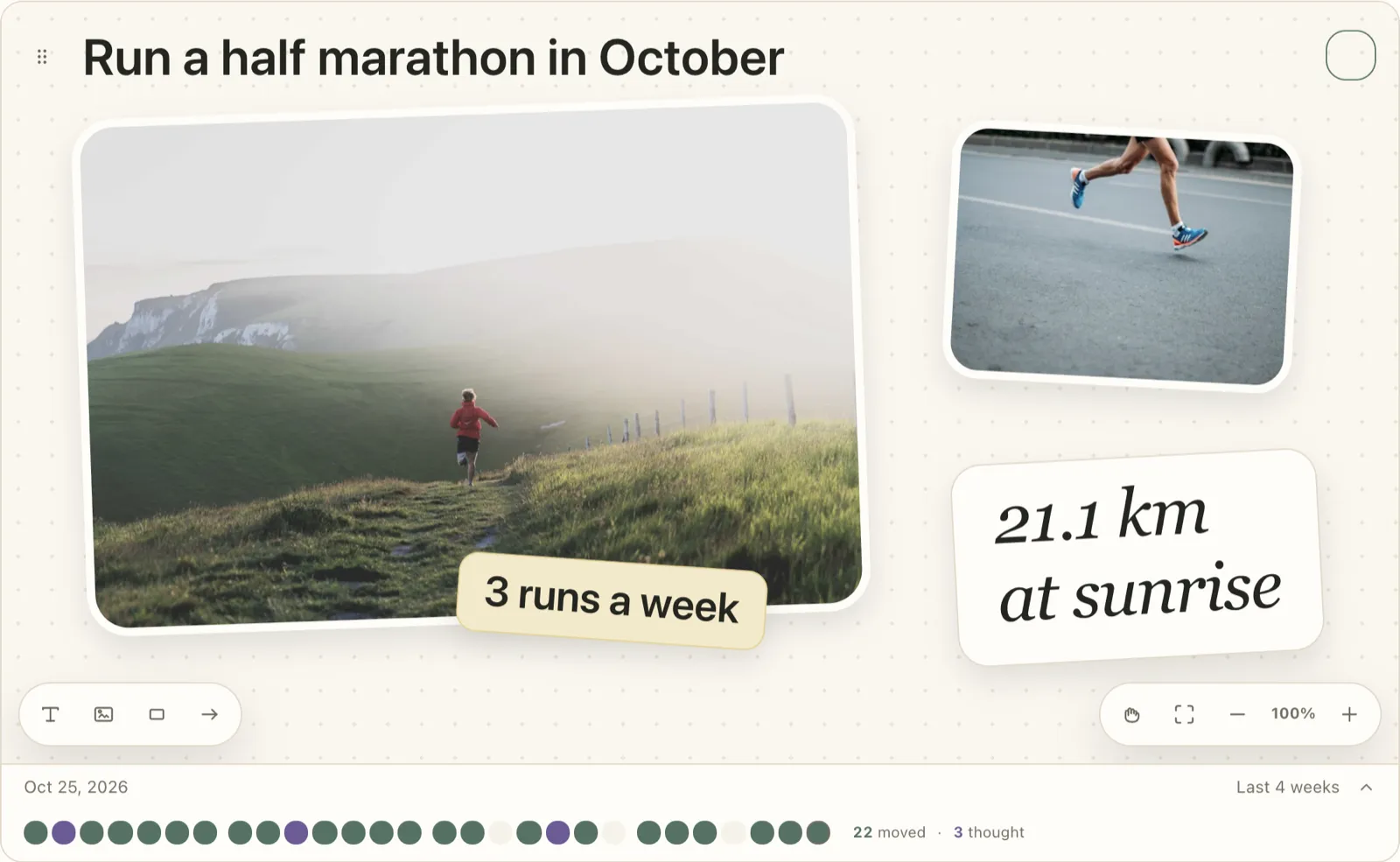
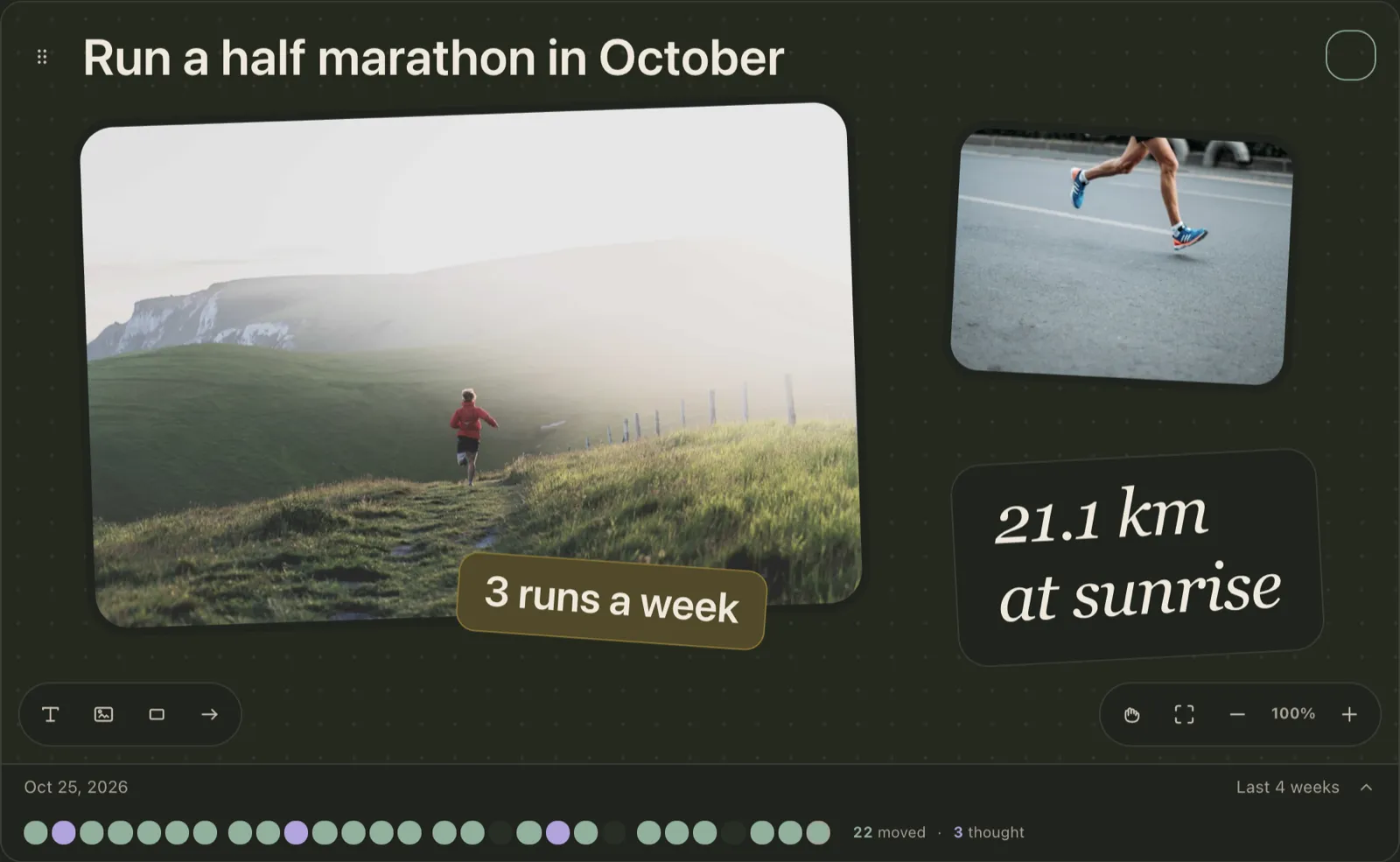
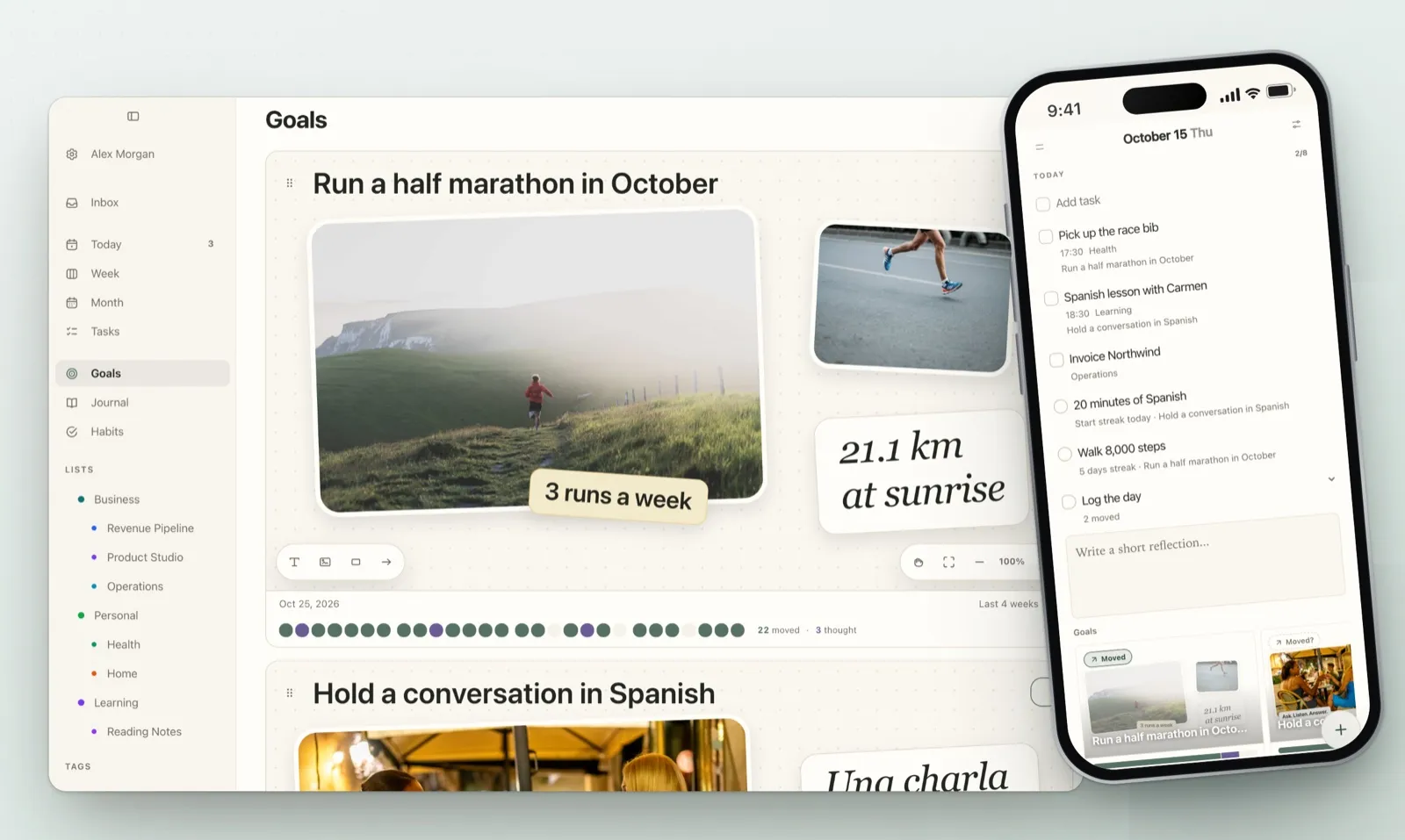
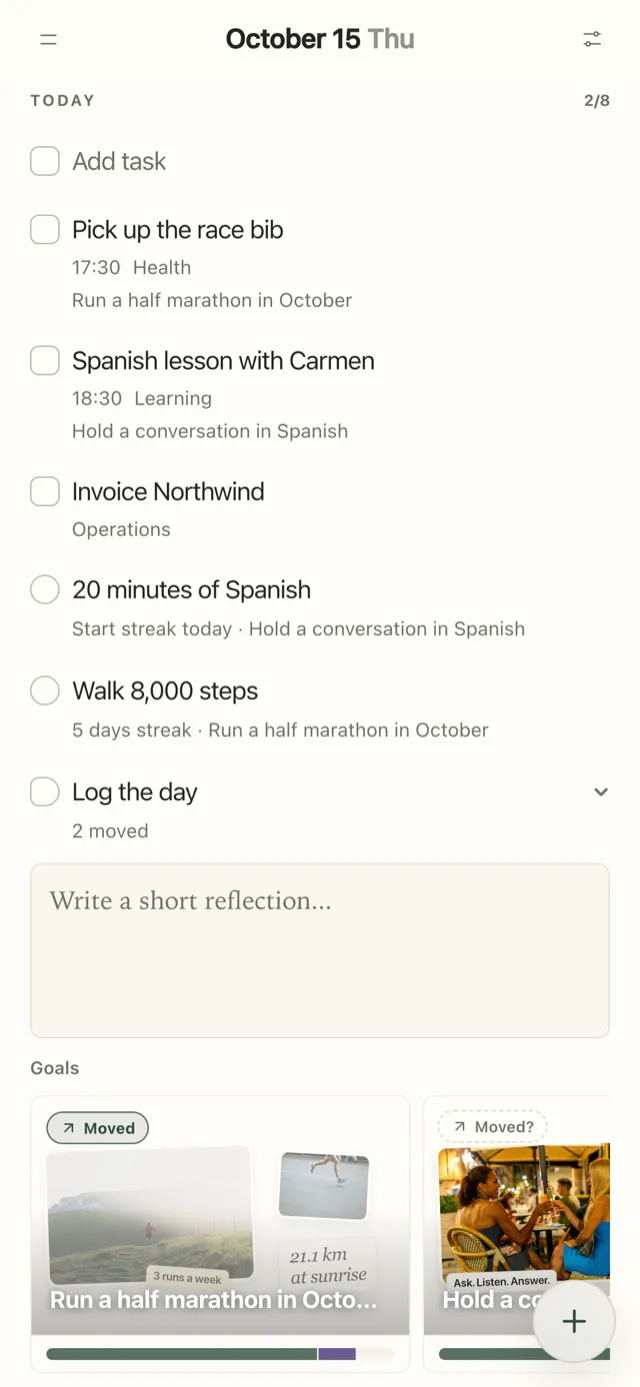
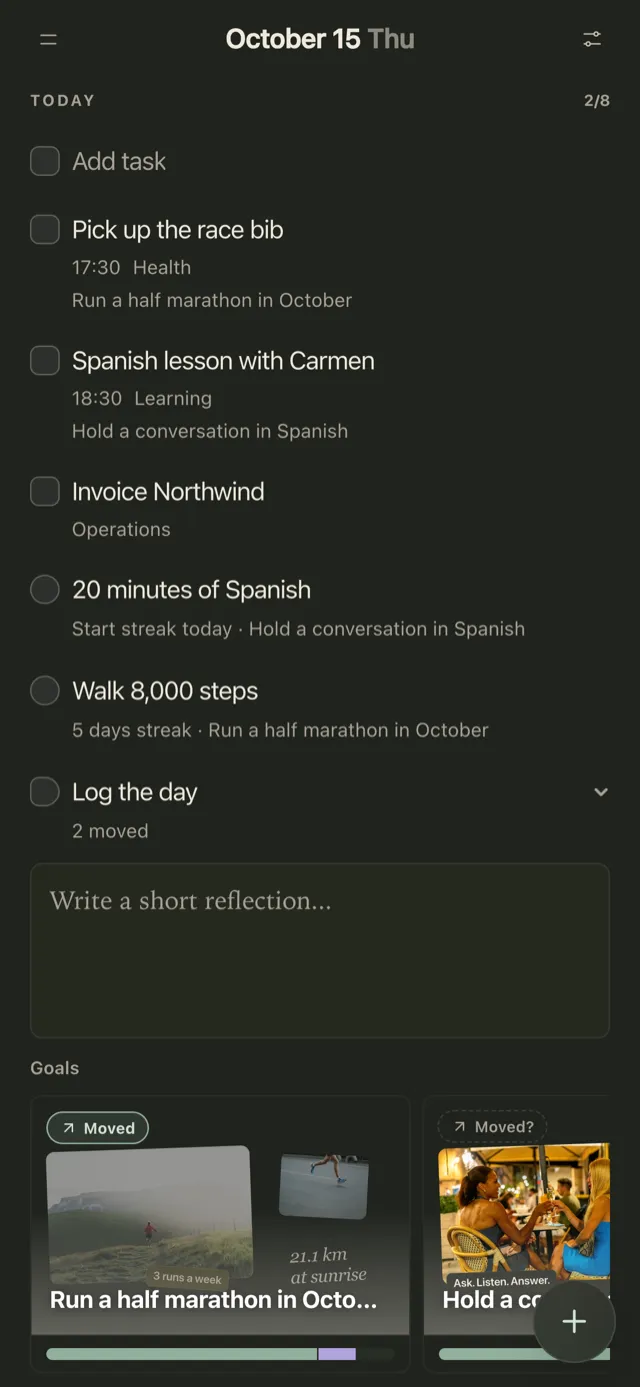
Plannedo is a daily planner where every goal has a board (photos, text, sticky notes, arrows) and a deadline that can be a date, a month, a quarter or a year. Tasks and habits can belong to a goal: tick off “Long run, 16 km” and the half-marathon goal is marked as moved for the day. In the evening, Log the day asks one question per goal, Moved, Thought or Not today, and the row under each goal keeps the last 28 days of answers, so after a few weeks you can see which goals you work on and which you only think about (See which goals are moving).
What it doesn’t do: there are no numeric targets or pace lines, so “save $5,000” is better tracked in Strides or Griply. There’s no Android app or Apple Watch app, and the widgets show your day rather than a single goal. For the board side of it, see Best Vision Board Apps.
2. Strides: numbers, pace lines and a long track record
- Best for: measurable goals on Apple devices.
- Runs on: iPhone, iPad, Mac and Apple Watch, plus an Android app. The web app has been retired.
- Price: free for three trackers. Strides Plus is $29.99 a year on the US App Store, which also sells monthly and lifetime options without labelling which price is which.
Strides has four kinds of tracker: habits, targets (a value by a date, with a pace line), averages, and projects broken into milestones. It’s been on the App Store since 2013, holds 4.8 stars from over 19,000 US ratings, and was updated monthly through 2026. The recurring complaints are the small free plan and occasional data problems after an update or a new phone. It has no image board and no way to link habits to a goal.
3. Griply: goals, subgoals, projects and habits in one place
- Best for: people who want a full goal system: goal, subgoals, projects, tasks and habits.
- Runs on: iPhone, Android (new in September 2026), Mac and Windows desktop apps, and the web. The iPad uses the web version.
- Price: free for 2 goals, 2 habits and 5 projects. On its site, Premium is $5.99 a month, $49.99 a year or $149.99 once, after a price rise on October 12, 2026. The US App Store still lists older prices.
Griply’s goals take a start value, a target and a deadline, in money, weight, distance, pages or your own unit, and tasks and habits linked to a goal show up inside it. Its widgets are the strongest on this list, and they’re free on every plan. Subgoals and the goal timeline are Premium. Reviewers praise how it connects daily work to bigger goals and mention a learning curve and the occasional bug.
4. Progress: progress bars on your Lock Screen
- Best for: a few numbers you want to see at a glance.
- Runs on: iPhone, iPad and Mac.
- Price: free for five trackers, with ads. Premium is $7.99 a year or $19.99 once.
Progress (now listed as “Progress: Goal & Habit Tracker”) is the simplest app here: a value, a target, a bar, a trend line and a projected finish date, with Home Screen and Lock Screen widgets you can update from. It has no milestones and no links to tasks or habits. Reviewers like how clean it is and dislike paying, or seeing pop-up ads, for something this simple.
5. GoalGo: a generous free plan on iPhone
- Best for: iPhone users who want widgets without paying.
- Runs on: iPhone only. Android is “coming soon”.
- Price: free for 2 goals, 4 habits and 1 challenge, with all widgets. Premium is $4.99 a month, $19.99 a year or $49.99 once.
GoalGo was rebuilt from scratch in September 2026. It handles goals to complete, numbers to reach and things to quit, with steps, notes, a pace line and a single Momentum score from 0 to 100. Since October, a counted habit can add to a goal, so 5 km on a run habit moves a “Run 500 km” goal. It’s very new: two ratings on the US App Store and no written reviews yet.
6. Goalify: goals with accountability groups
- Best for: goals you want to share with a group or a coach.
- Runs on: iPhone, iPad and Android, with a web version for coaching.
- Price: free for 3 goals and 1 accountability group. Premium is $3.99 a month or $39.99 a year.
Goalify treats every goal as something to reach, complete, limit or avoid, on a daily, weekly or monthly schedule, with custom units. Its distinguishing feature is social: groups, challenges, leaderboards and chat. It has no deadlines or milestones, and its last update was in July 2026.
7. Habitica: your goals as a role-playing game
- Best for: people who need a game to keep going.
- Runs on: iPhone, iPad, Android and the web.
- Price: free. An optional subscription ($4.99 a month or $47.99 a year) adds cosmetics and gems.
Habitica turns habits, dailies and to-dos into a game: your avatar levels up when you do them and loses health when you don’t, and you can join a party or a challenge. Its own FAQ says it has no charts of your progress over time, and there are no numeric targets or goals as such. Reviewers love the motivation, especially those with ADHD, and complain that gems are effectively pay-only.
8. TickTick: a task manager with a habit tracker
- Best for: people who want tasks, calendar, habits and a focus timer in one app.
- Runs on: iPhone, iPad, Apple Watch, Android, Mac, Windows, Linux and the web.
- Price: free for 5 habits and 9 lists. Premium is $49.99 a year on TickTick’s site; the US App Store also sells it at $4.99 a month.
TickTick has no goals module. Its habits take daily amounts (“read 20 pages”), check-in logs and a heat map, and its widgets cover the Home Screen, Lock Screen and Apple Watch. For a goal made of daily habits it works well; for a goal with a deadline and a target, it doesn’t track that. The most common recent complaint is basics behind the paywall, summed up in one September 2026 review title: “Have to pay just to have monthly view”.
9. Beeminder: money on the line
- Best for: people who’ve tried everything else and need a real consequence.
- Runs on: the web, with companion apps for iPhone and Android.
- Price: free for 3 goals. You pay a pledge each time you go off track, usually $5 at first, then $10, $30, $90 and so on, up to a cap you set. Paid plans start at $8 a month.
Every Beeminder goal is a number on a graph with a “bright red line” you must stay on the right side of. Data can come in automatically from Fitbit, Todoist, Apple Health and other services. The iPhone app is for entering data only: sign-up, payment and goal setup happen on the website, and there are no widgets. It isn’t pretty, and it works for a specific kind of person.
10. Notion: build exactly the tracker you want
- Best for: people who enjoy building their own system.
- Runs on: web, iPhone, iPad, Android, Mac and Windows.
- Price: free for one person; Plus is $10 a month billed yearly.
Notion has no goal feature of its own. You start from a goal tracker template, many made by other users, and link goals to tasks with relations and roll-ups. Anything is possible and nothing is set up for you. Recent App Store reviews are dominated by complaints that the iPhone app is slow and buggy.
Others I looked at
Habi (iPhone, iPad, Mac) combines habits, a calendar, projects and a focus timer and is generous for free, but it’s mostly a habit app and only launched in January 2026 (habit apps get their own comparison in the best habit tracker apps). ClickUp and Weekdone track goals and OKRs for teams: ClickUp includes Goals from $9 per user a month, and Weekdone is free for up to three users. For personal goals, both are more than you need.
What the reviews keep saying
Across the App Store reviews of these apps, the same four complaints come up:
- Free plans that fit two or three goals. Strides, Griply, Goalify and GoalGo all stop there.
- A subscription for something simple. Progress reviewers in particular don’t want to rent a progress bar, and its free version shows ads.
- Paywalled basics. TickTick’s calendar views are the most cited example.
- Bugs after updates. Widgets that stop refreshing and history lost on a new phone show up for several apps.
And one thing the research adds that reviews don’t: whichever app you choose, it only helps if you look at it. Pick the one you’ll open daily, and once a week, read back what it recorded. A 20-minute weekly review is a good place for that.
FAQ
What is the best goal tracker app?
For numeric goals on Apple devices, Strides. For a full system of goals, subgoals, projects and habits across platforms, Griply. For goals tied to your daily tasks and habits, with a visual board, Plannedo. For accountability, Beeminder or Goalify.
What is the best free goal tracker app?
GoalBar is completely free with unlimited goals but is iPhone only. Habitica is free with optional cosmetics. Plannedo’s free plan includes one goal with a full board, unlimited tasks and three habits. Strides and Goalify are free for three goals, GoalGo and Griply for two.
What is the best goal tracker app for iPhone?
Strides has the longest track record and 4.8 stars from over 19,000 US ratings. Griply has the best free widgets. Progress is the simplest. Plannedo suits goals you want tied to your daily plan, on iPhone and Mac.
Is there a goal tracker app with a widget?
Yes. Griply has free Home Screen and Lock Screen goal widgets, Progress has Home and Lock Screen widgets you can update from, and GoalGo includes four widgets on its free plan. Plannedo’s widgets show today’s tasks and habits, and ticking off linked items moves the goal.
Is there a goal tracker app for Android or Windows?
Griply runs on Android, Windows, Mac and the web. TickTick, Notion and Habitica run on Android and in a browser, and TickTick and Notion have Windows apps. Strides and Goalify have Android apps. Plannedo works on Android and Windows in the browser.
Do goal tracking apps actually work?
A 2016 meta-analysis of 138 experiments with almost 20,000 people found that getting people to monitor their progress made them more likely to reach their goals, and that it worked through checking more often. It was stronger when progress was written down and when it was shared. An app helps to the extent that it gets you to do those things.
What’s the difference between a goal tracker and a habit tracker?
A habit tracker records whether you did something on a given day. A goal tracker records progress toward an outcome with an end, often a number and a deadline. Many goals are reached through habits, which is why the best apps let you link the two.
Studies mentioned
- Harkin, B., Webb, T. L., Chang, B. P. I., Prestwich, A., Conner, M., Kellar, I., Benn, Y., & Sheeran, P. (2016). Does monitoring goal progress promote goal attainment? A meta-analysis of the experimental evidence. Psychological Bulletin, 142(2), 198-229.