Weekly Review Template: Questions and a 20-Minute Checklist
A 20-minute weekly review template with the questions to ask, a checklist to copy, and the one step most templates skip, backed by research on planning.
A weekly review is a short session, once a week, where you close the loops left open, look at what really happened, and plan the next seven days from that. The template below takes 20 minutes in four parts: close (5 minutes), look back (5), plan (7) and write it down (3). Each part comes with its questions, and there’s a checklist at the end to copy.
Most weekly review templates stop at “what went well, what didn’t”. The part they skip is the one with the best research behind it: using last week’s real numbers to size next week’s plan. Psychologists who study the planning fallacy found that remembering the past isn’t enough. People make realistic plans only when they connect how things went last time to the plan they’re making now.
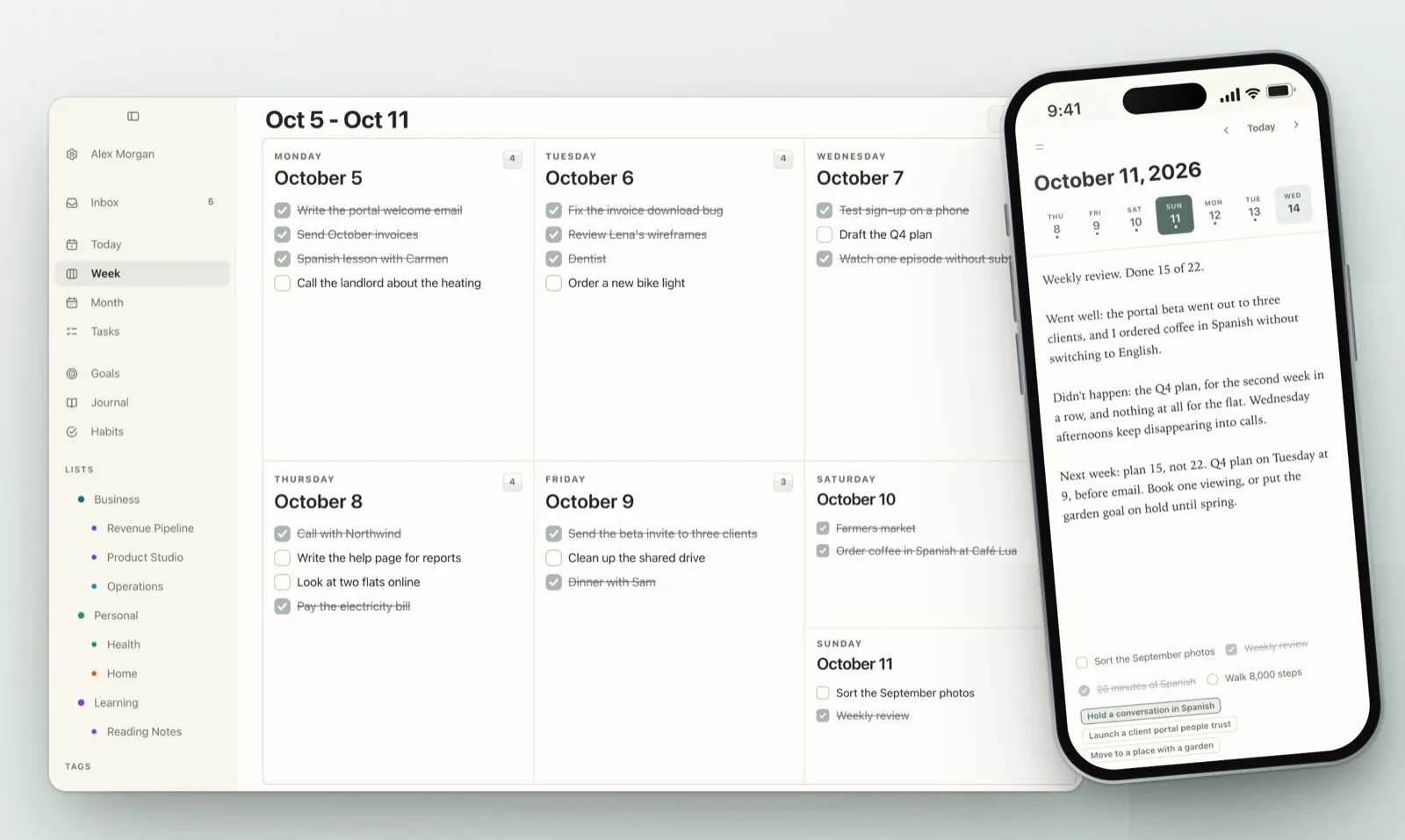
I build Plannedo, a planner with a Week view, goals and a journal, so the examples come from there. The week in the screenshots is a demo week. Every step works the same way on paper or in any other app.
The 20-minute weekly review template
| Part | Time | What you do | The question that matters |
|---|---|---|---|
| 1. Close | 5 min | Empty your head, sort the inbox, decide what happens to every unfinished task | What’s still open, and what will I do with it? |
| 2. Look back | 5 min | Count what you planned and what you finished, check each goal | What did last week actually look like? |
| 3. Plan | 7 min | Put next week’s tasks on days, no more than you really finished last week | Is this plan bigger than what I really did? |
| 4. Write it down | 3 min | Three or four short lines in a journal or a note | What will I want to read next Sunday? |
Twenty minutes is on purpose. A review you skip helps less than a short one you do every week, and once last week is in front of you, the parts that need real thinking fit in that time. If you have more, spend it on step 3.
Step 1: Close the loops (5 minutes)
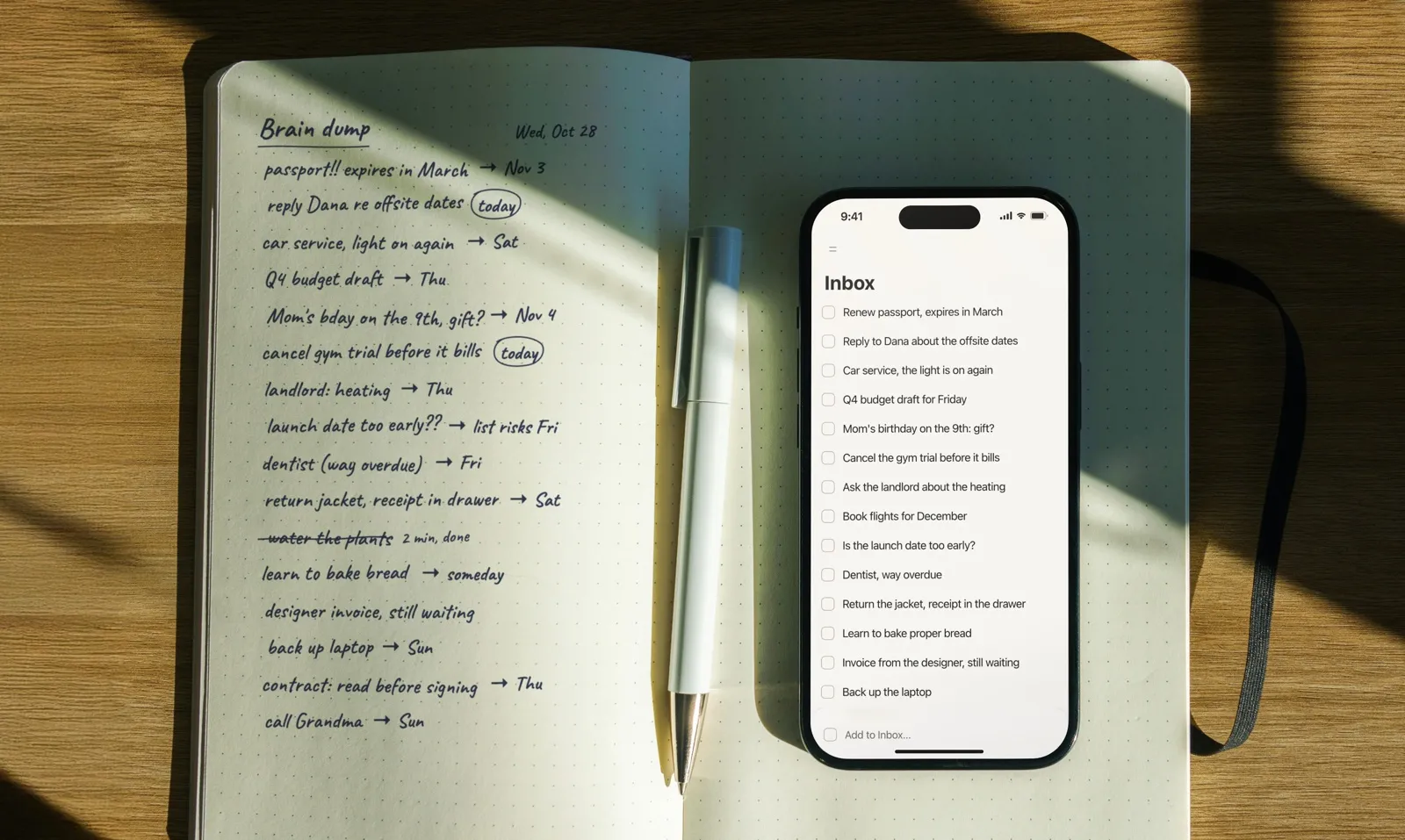
Start by getting everything out of your head and into one place: the call you promised to return, the idea from Tuesday’s walk, the thing a colleague asked about in the corridor. That’s a short brain dump. Then give every unfinished item an answer. There are only four:
- A day. It goes onto a specific day next week.
- Someday. You still want it, just not now. It leaves your lists without a date.
- Someone else. You send the message now, or note who you’re waiting for.
- Delete. You don’t want it anymore, which happens more often than it feels.
Why decide instead of rolling everything forward? In a 2011 series of experiments, E. J. Masicampo and Roy Baumeister gave people a goal and left it unfinished. The open goal followed them around: it caused intrusive thoughts while they read an unrelated text and made them worse at an unrelated word puzzle. When participants wrote a specific plan for the goal, those effects disappeared, although the goal itself still wasn’t done. The plan was enough for the mind to put it down.
That’s what the first five minutes are for. An unfinished task with a day on it stops nagging. One that slides to “later” keeps nagging.
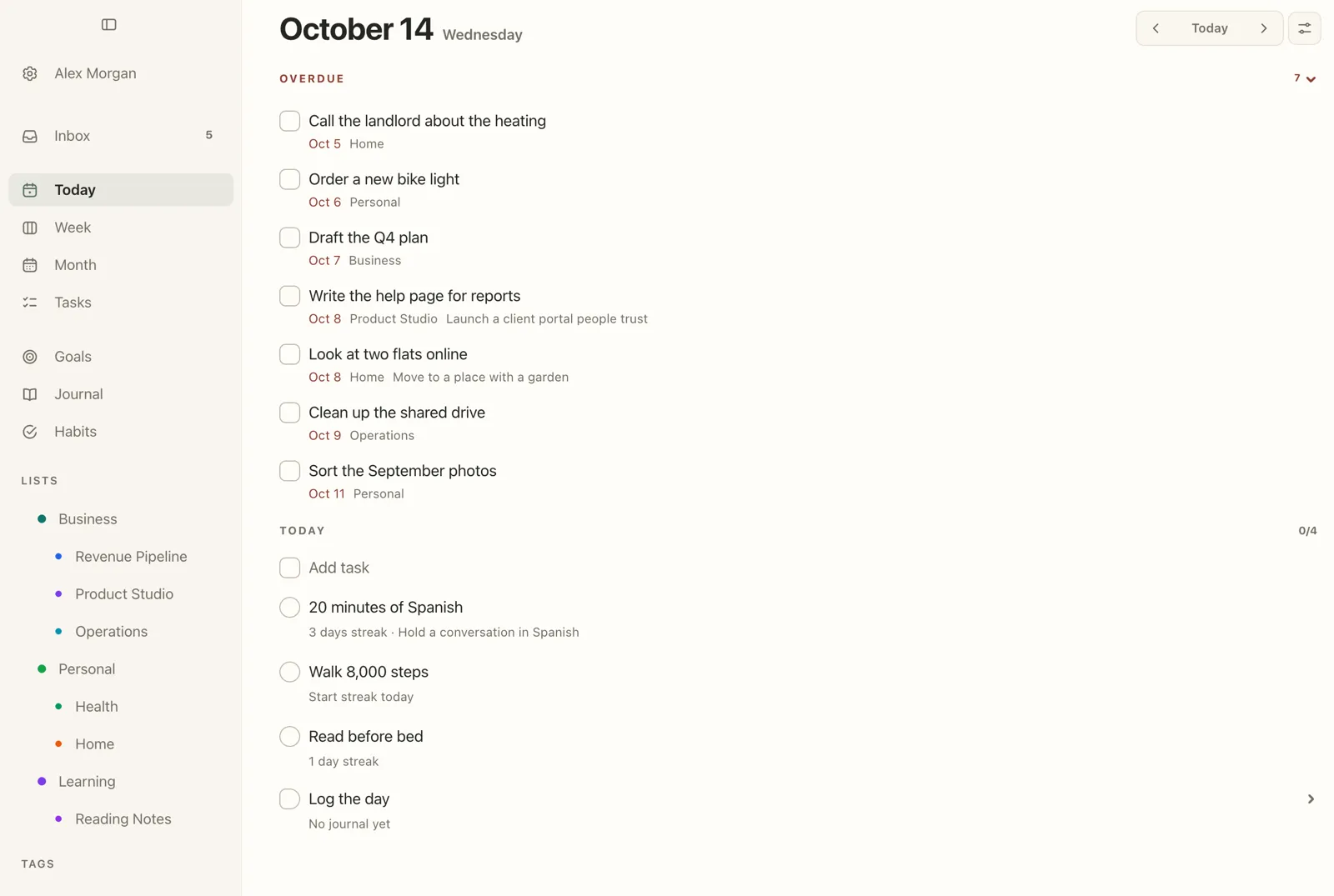
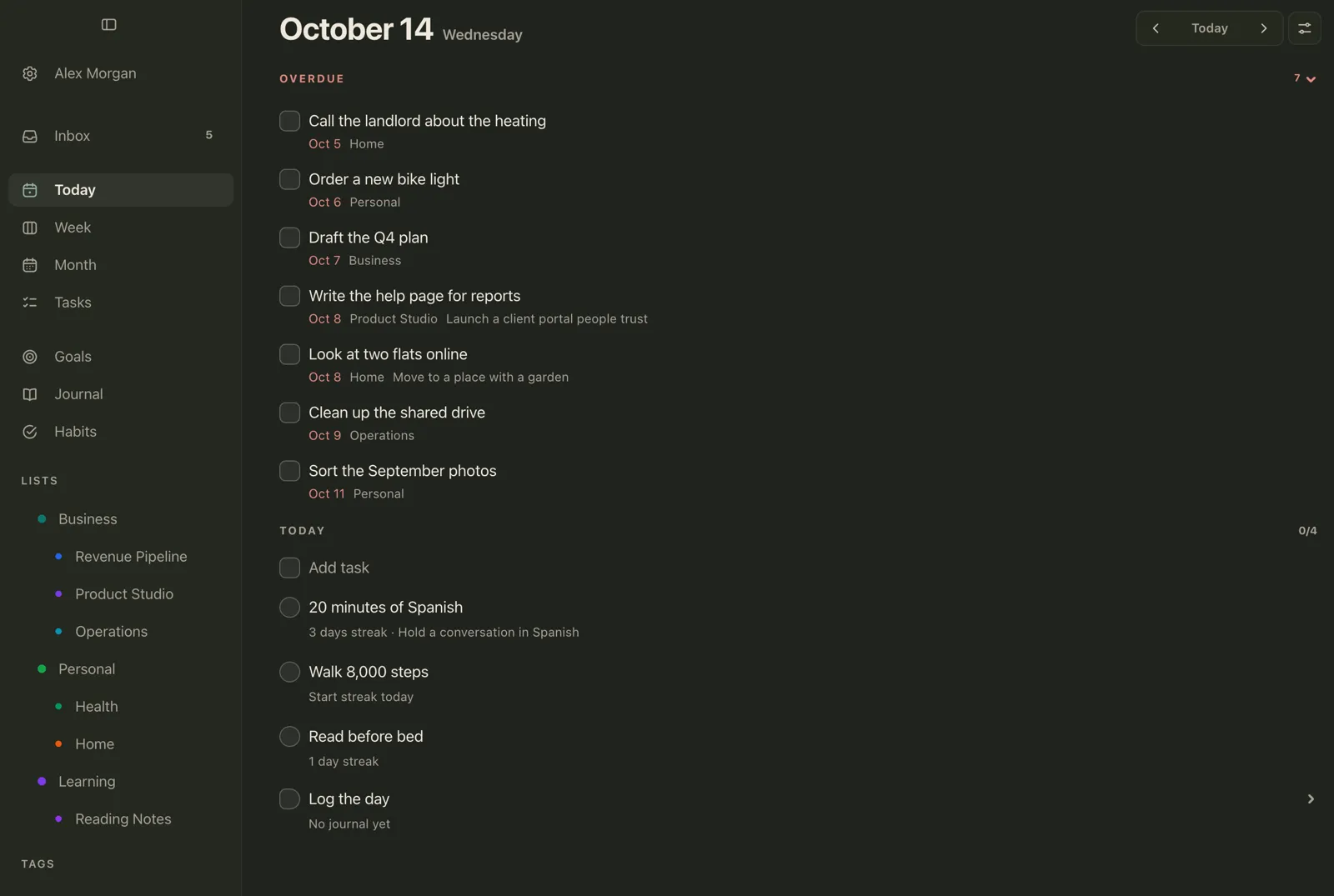
In Plannedo, unfinished tasks from earlier days collect under Overdue at the top of Today. On the Tasks screen you can Select several at once and send them to Today, Schedule them for another day, move them to Someday or Delete them (Find and bulk-edit tasks). New thoughts wait in the Inbox, where every item has the same choices (Inbox).
Questions for step 1:
- What’s still on my mind that isn’t written down anywhere?
- What did I promise someone this week?
- Which unfinished task can I simply delete?
Step 2: Look back (5 minutes)
Now look at last week as it really was, not as you remember it on Sunday evening. Open last week in your planner or calendar and count two numbers: how many things you planned, and how many you finished. In the example week it was 15 out of 22.
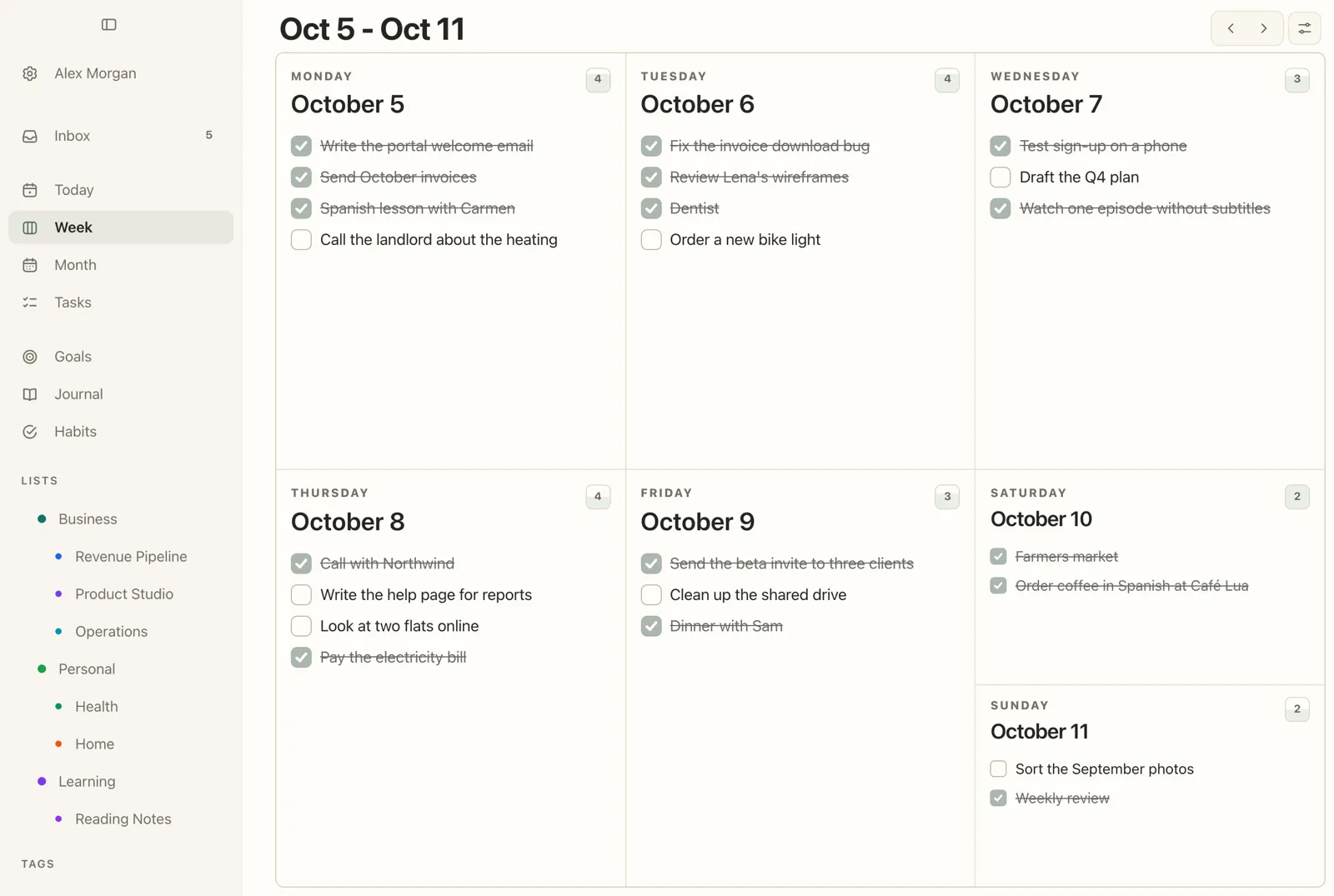
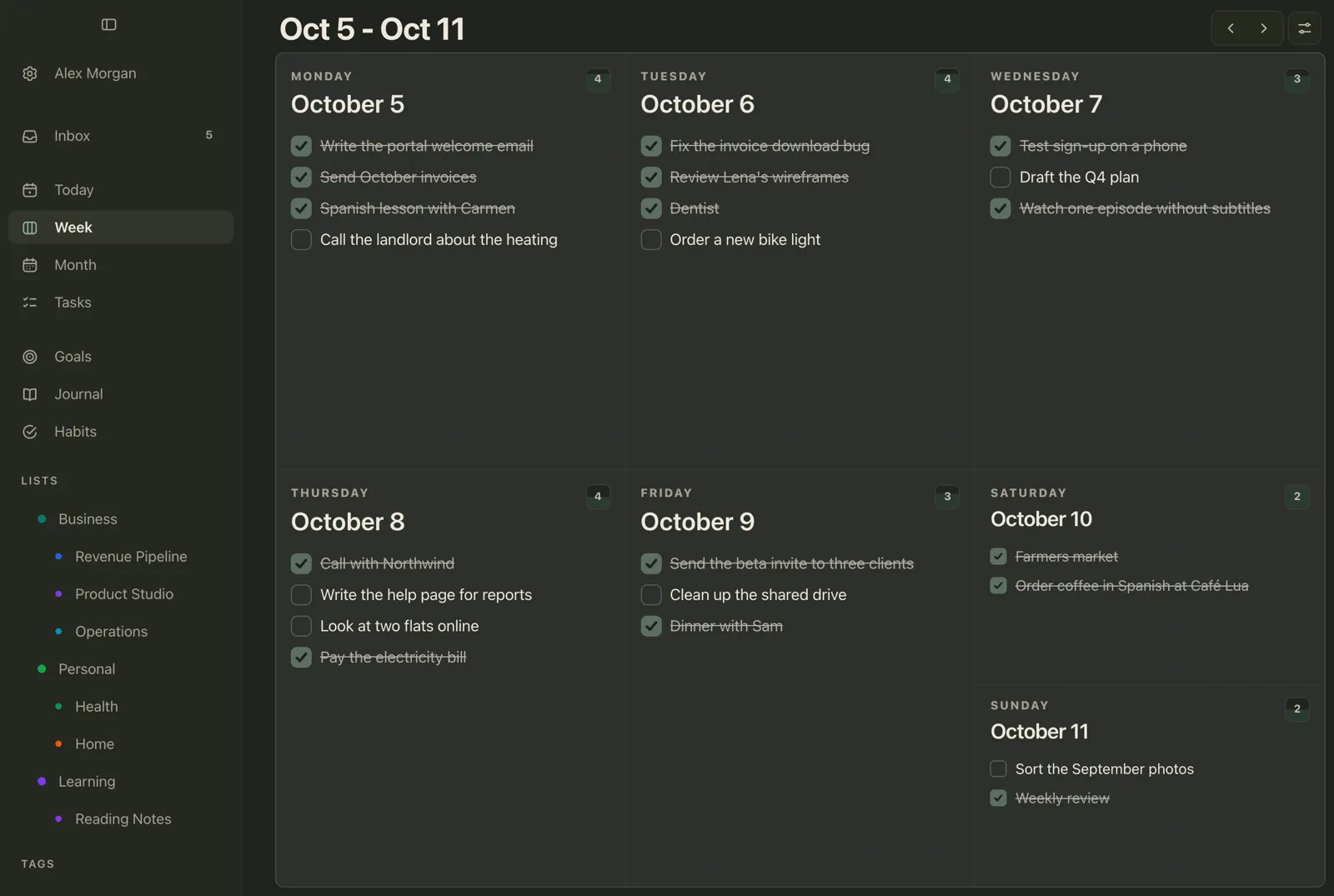
Then answer a few questions, in writing. Writing is the part that does the work. In a field study at Wipro, an outsourcing company in Bangalore, Giada Di Stefano, Francesca Gino, Gary Pisano and Bradley Staats asked new call-centre trainees to spend the last 15 minutes of each training day writing about the lessons they’d learned. On the final training test, that group did 22.8% better than trainees who kept working through those 15 minutes. That was daily reflection during training rather than a weekly review, but the active ingredient is the same: stopping to put into words what the experience taught you.
Questions for step 2:
- What did I finish? Start here: the list is usually longer than it feels. A ta-da list kept through the week answers it in a minute.
- What did I plan but not do, and what got in the way?
- Does that thing get in the way most weeks?
- Which goal moved, and which did I only think about?
- What do I want to repeat next week?
Question 6 deserves a second look. Roger Buehler, Dale Griffin and Michael Ross, whose research step 3 is built on, found that people explain their past planning failures with causes that are external, temporary and specific: a client emergency, a cold, a strange week. Each excuse may be true, and together they hide the pattern. In the example, the Q4 plan slipped for the second week in a row because Wednesday afternoons kept filling up with calls. Two weeks in a row is a pattern, and a pattern can be planned around.
Check your goals, not only your tasks
Tasks tell you whether you were busy. Goals tell you whether it was the right kind of busy. For each goal, ask whether this week moved it or whether you only thought about it.

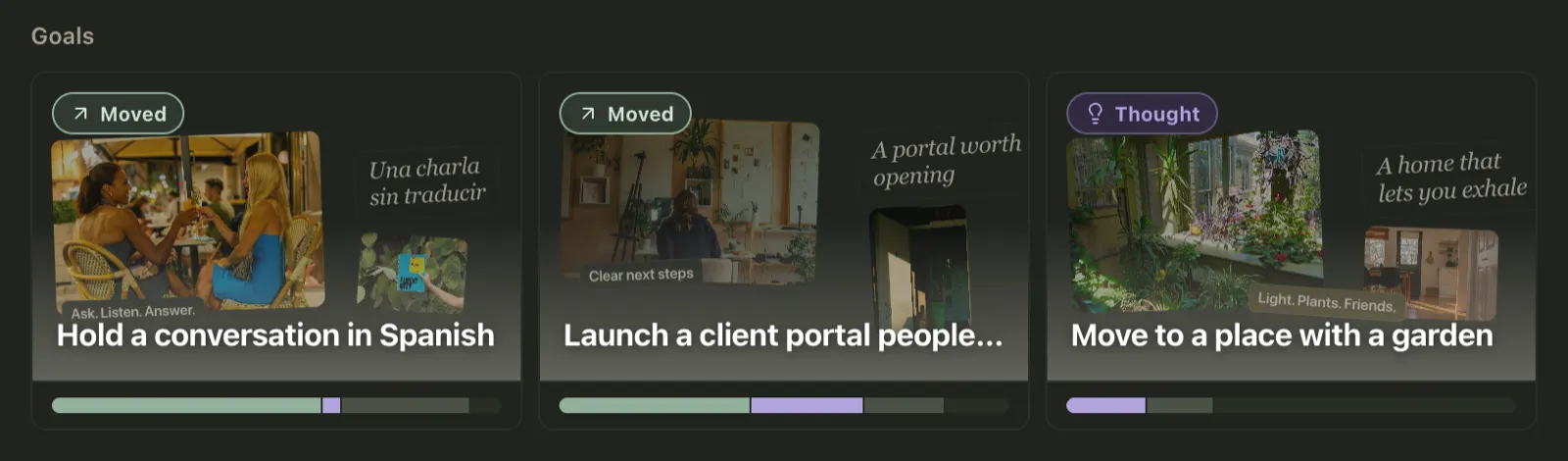
In Plannedo, Log the day asks one question per goal every evening (Moved, Thought or Not today). Each goal card shows the bar for the last four weeks, and the Goals screen has the same history day by day, as a 28-day ribbon under each board (See which goals are moving). It’s meant to be read once a week, which makes it a good fit for this step. A goal with weeks of “thought” and no “moved” needs a decision: one small task on a real day, or an honest “not this season” and a pause. If you’re still choosing an app for this, I compared ten in Best Goal Tracker Apps.
Look at your habits the same way, over the last four weeks rather than the current streak. A single missed day matters little for a new habit, as the research in How Long Does It Take to Form a Habit? shows. The same day missed every week usually means the schedule needs changing.
Step 3: Plan next week from last week (7 minutes)
This is the step that makes a review worth doing, and the one with the most research behind it.
In 1994, Buehler, Griffin and Ross asked 37 psychology students to predict when they would hand in their honours thesis. The average best guess was 33.9 days. The average actual time was 55.5 days, and fewer than a third finished by the date they had predicted. The students also gave a forecast for the case where everything went as badly as it possibly could. Even that averaged 48.6 days, still about a week short of what really happened.
The researchers’ explanation is the useful part. When we plan, we picture how the work will go and ignore how similar work went before. Their paper opens with a familiar scene: academics who take home a briefcase full of work every Friday, although on previous weekends they never got past the first one or two jobs.
So they tested a fix. In a later study, 123 students predicted when they would finish a computer assignment. One group made the prediction as usual. A second group first described how similar assignments had gone for them in the past. A third group did the same and then had to work out how that past applied to this assignment.
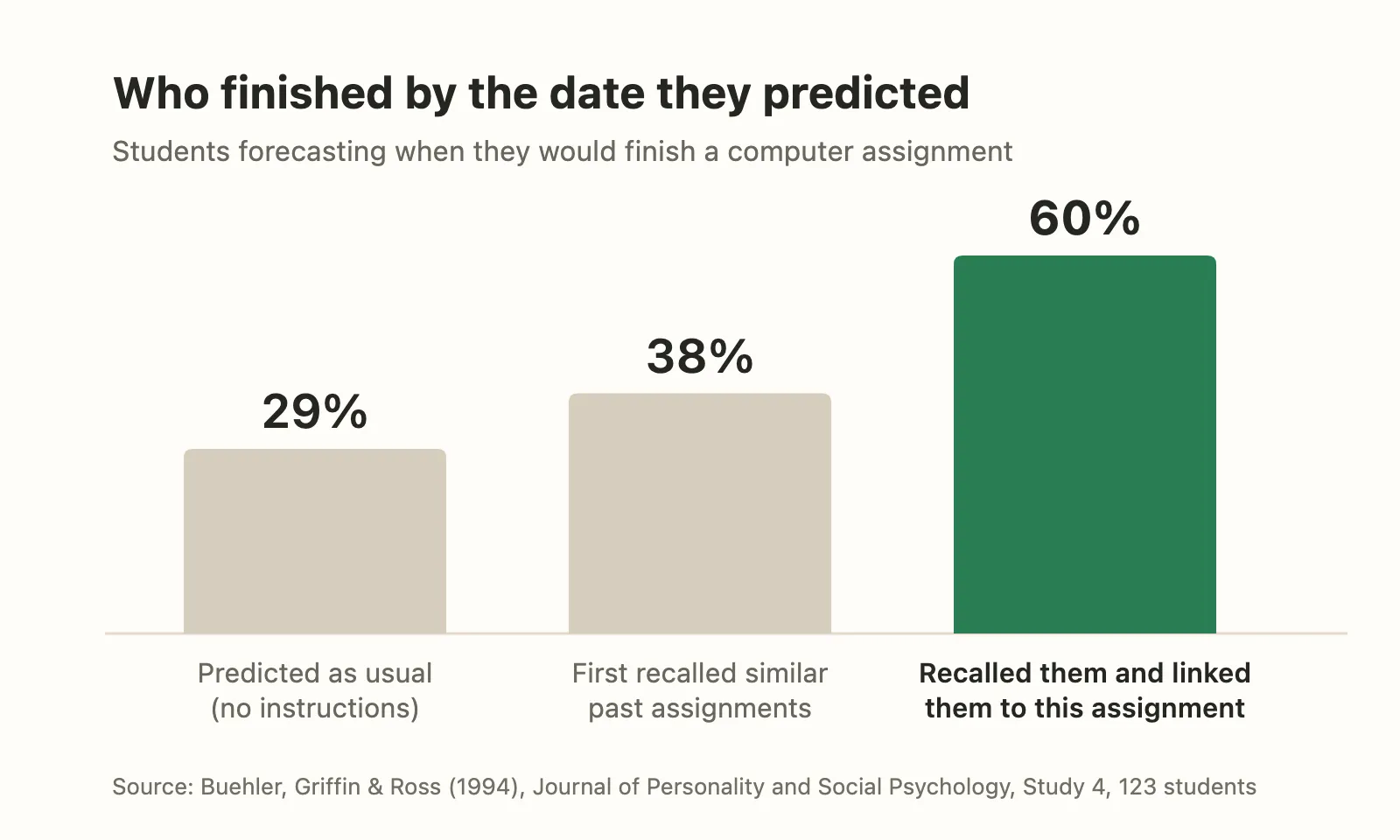
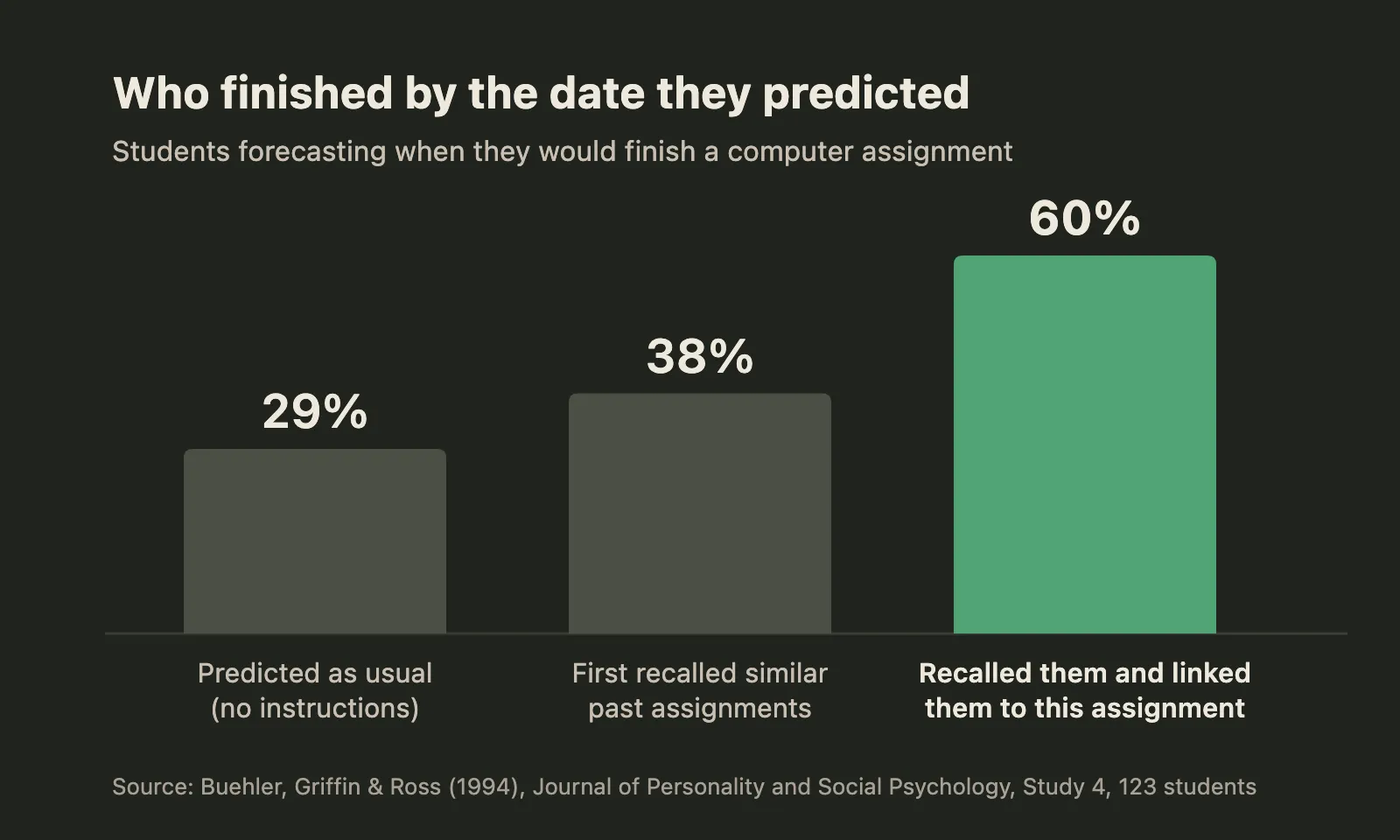
Only the third group’s predictions came out without the usual optimism: 60% finished by the date they predicted, against 29% of the group that predicted as usual. Remembering alone did little; the second group’s 38% wasn’t significantly different from the first. And notice what changed: the students in the third group didn’t work any faster. Their plans got honest.
That is the line most templates leave out between “look back” and “plan ahead”. In practice it comes down to one rule: don’t plan more than you actually finished last week. If you got 15 things done, plan 15, not 22. If something has slipped two weeks running, it needs a different time slot, not a stronger intention.
Questions for step 3:
- How much did I really finish last week, and is next week’s plan bigger than that?
- What’s already fixed next week: appointments, deadlines, trips?
- Which one to three things would make next week a good week, and which day does each go on?
- What’s the next step for each goal, and on which day?
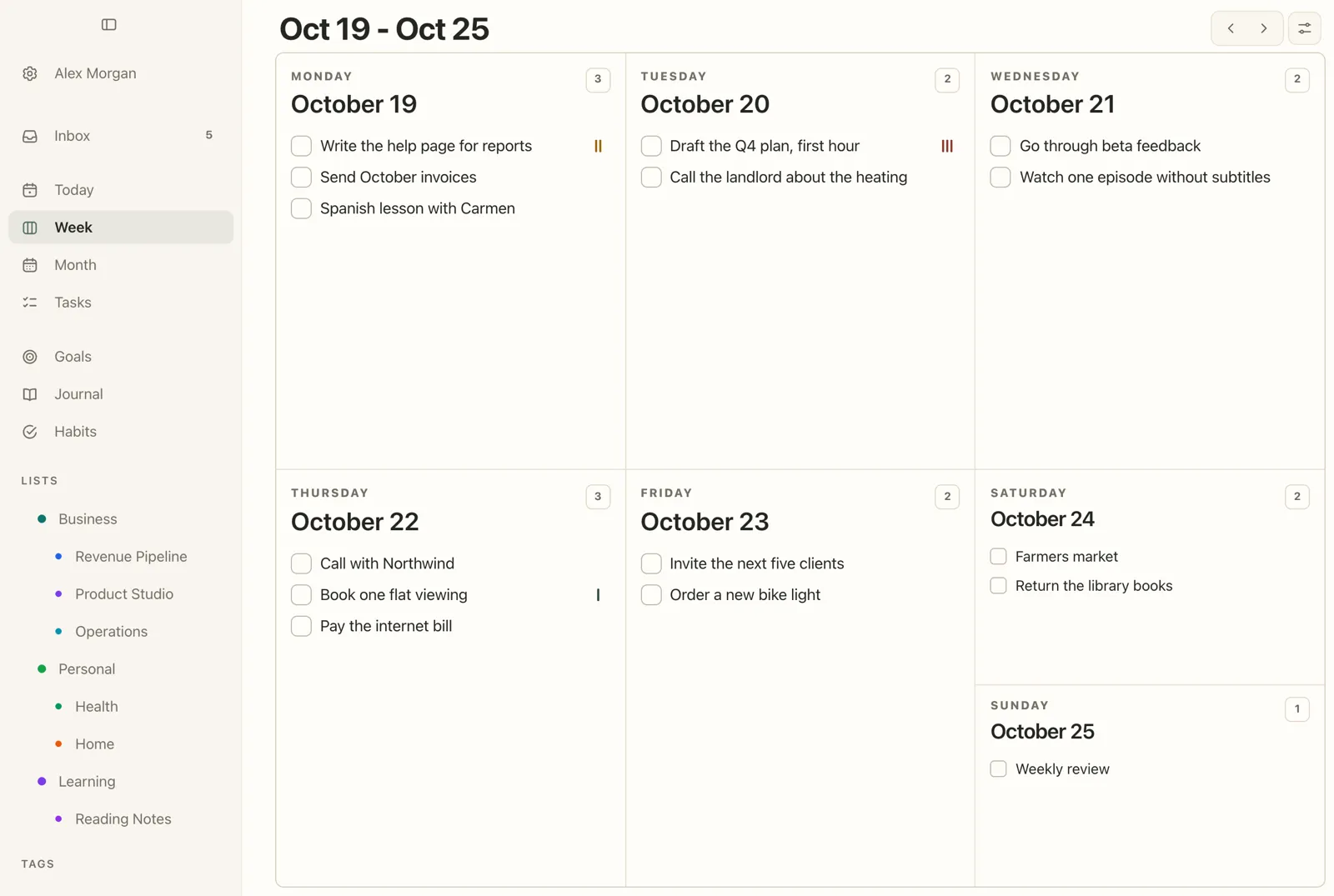
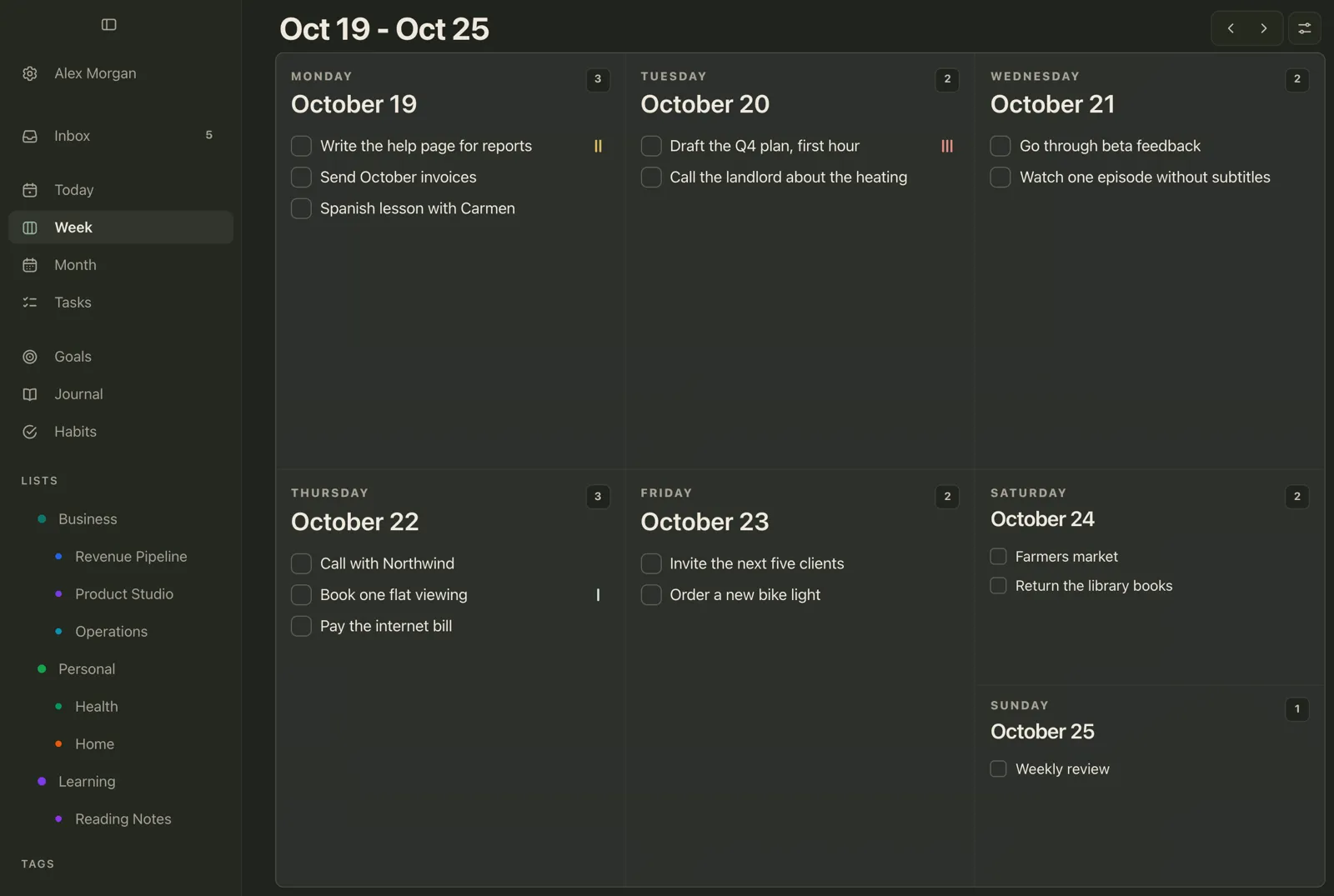
A few things help the plan hold:
- The hardest task goes first in its day, with a time if it needs one. In the example, the Q4 plan that slipped twice now sits on Tuesday at 9, before email.
- Every active goal gets one dated step. A goal with nothing on the calendar isn’t really part of the week.
- Leave room. The week will bring its own tasks, and a plan that fills every day has no space for them.
In Plannedo, open next week on Week with the arrow next to the title, add tasks to each day and drag them between days (Week and Month). The planning itself, step by step, is in how to plan your week. Set a task’s Goal field to link it to a goal: ticking it off then marks the goal as moved for that day.
Step 4: Write it down (3 minutes)
Finish with three or four short lines in a journal or a note. If you already keep a one line a day journal, reading the week’s seven lines first makes this part quick. Keep the same shape every week, so that next week’s review can start by reading this one:
- Done X of Y.
- Went well: one or two things.
- Didn’t happen, and why: the pattern, not the excuse.
- Next week: the rule or the change you’re making.
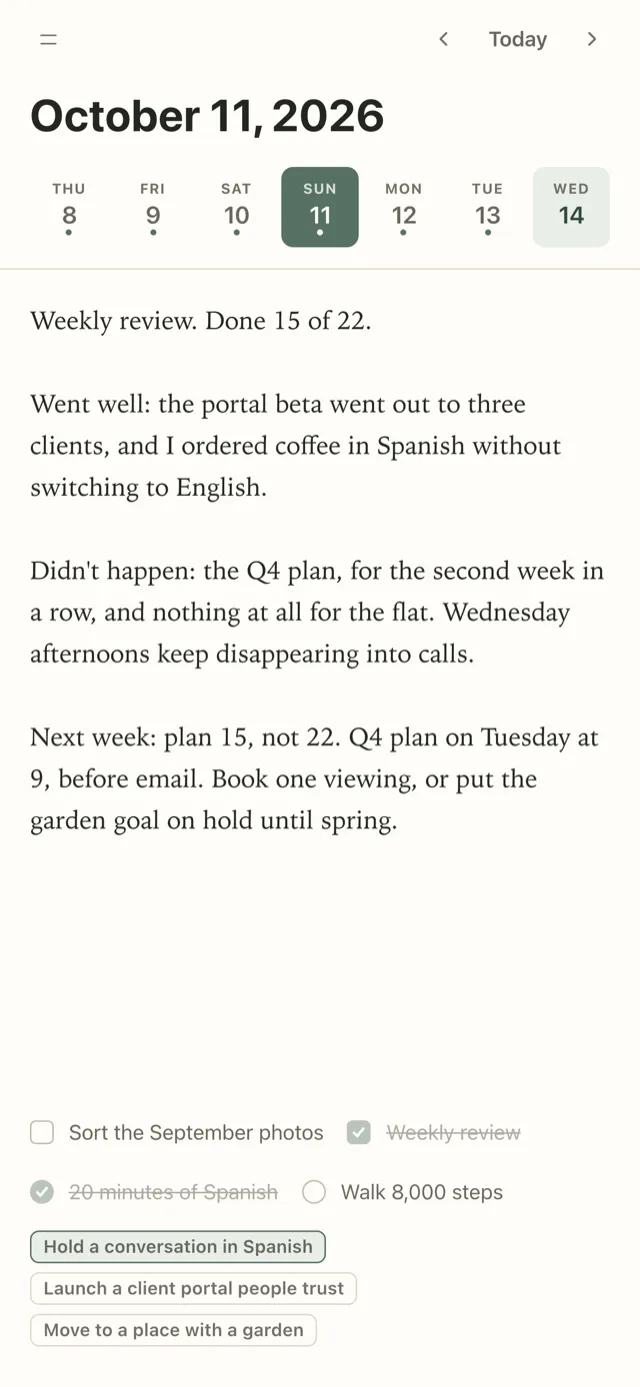
A week later, that last line is the first thing to check: did the change work? On weekdays, the same habit shrinks to ten minutes each evening: plan your day the night before. In Plannedo, the Journal keeps a strip of the last six weeks at the top, so last Sunday’s entry is one tap away (Journal).
The weekly review checklist
Copy this into your planner, a notes app or a bullet journal:
- Write down everything that’s still on your mind
- Sort the inbox: a day, Someday, or delete
- Give every unfinished task a new day, Someday, or delete
- Count last week: planned and done
- Note one thing that went well and one that didn’t, with the reason
- Ask whether that reason comes up most weeks
- Check each goal: moved, or only thought about?
- Look at next week’s fixed events and deadlines
- Plan next week, no bigger than last week’s real number
- Give every active goal one step on a specific day
- Write three or four lines in your journal
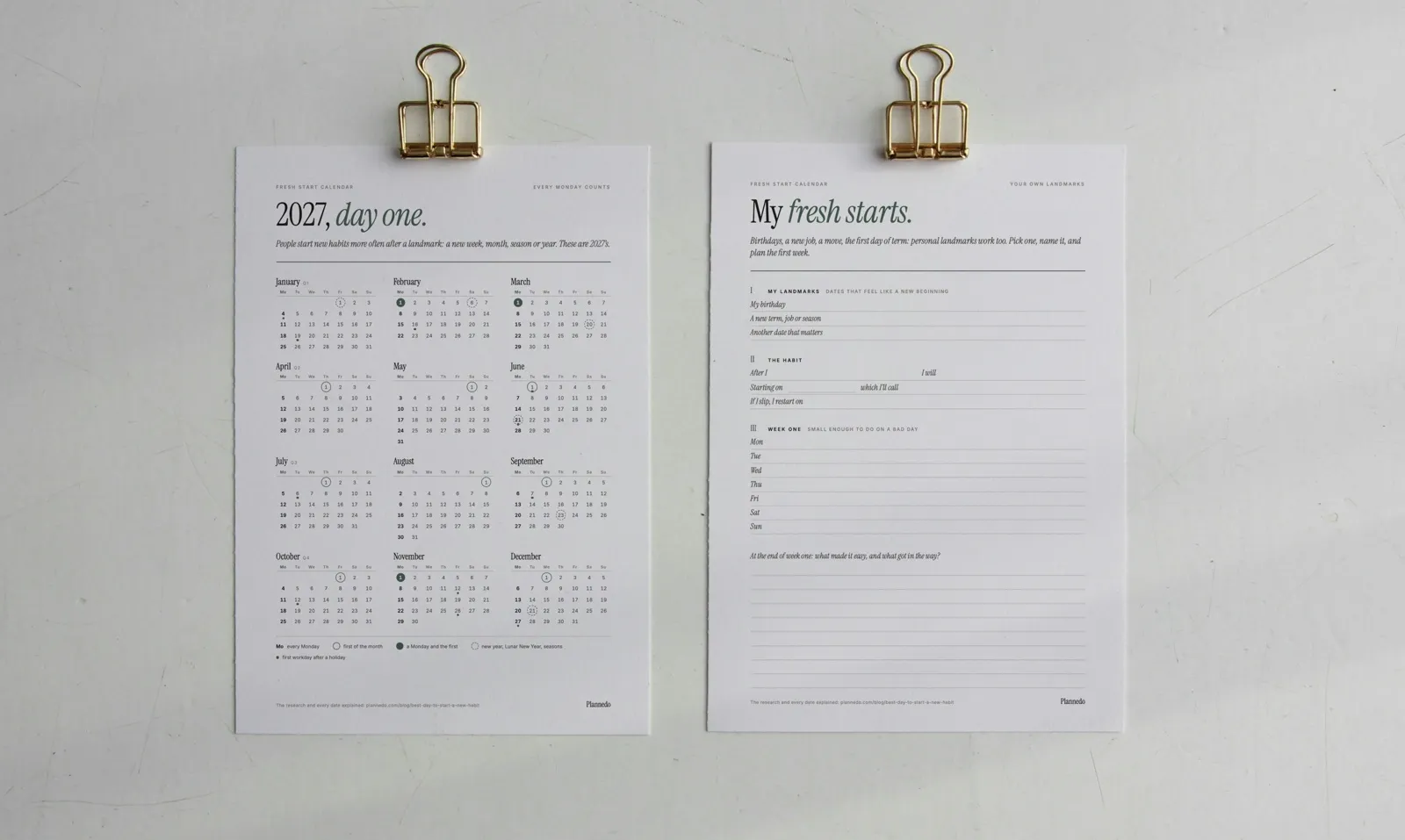
Every item on this checklist has its own place on the printable template, so you can work through it on paper: US Letter PDF or A4 PDF.
To make sure the review itself happens, put it on your calendar as a repeating task. In Plannedo that’s a task on a Sunday with Repeat set to Weekly and a time (Repeating tasks).
More weekly review questions
The twelve questions above are enough for most weeks. For a week that deserves more thought, pick a few of these.
About the week
- What surprised me?
- When was I at my best this week, and what was different about that day?
- What drained my energy, and can I avoid it next week?
- What did I say yes to that I should have turned down?
- Who helped me, and have I thanked them?
About goals
- If I could move only one goal next week, which would it be?
- Which goal do I keep thinking about but never schedule? What’s the smallest possible step?
- What would I stop doing if I took this goal seriously?
Weekly review journal prompts
- One sentence about this week that I’d like to remember a year from now.
- What did I learn about how I work?
- What am I looking forward to next week?
Once a year the same idea works on a bigger scale: a year in review walks the past twelve months, month by month, and turns them into next year’s goals. In between, the 12 Week Year turns the weekly review into a score: tactics done out of tactics planned.
GTD weekly review vs a 20-minute review
David Allen’s Getting Things Done made the weekly review famous, and Allen calls it the critical success factor for the whole method. The official GTD version has 11 steps in three stages: Get Clear (collect loose papers, process your inboxes, empty your head), Get Current (go through next actions, the past and upcoming calendar, the waiting-for list, projects and checklists) and Get Creative (go through the someday/maybe list and look for new ideas).
| GTD weekly review | 20-minute review | |
|---|---|---|
| Steps | 11, in Get Clear, Get Current and Get Creative | 4: close, look back, plan, write it down |
| Time | Depends on how many projects and lists you keep | About 20 minutes |
| Best for | People who run a full GTD system | Anyone planning a personal week around a few goals |
| Goals | Through project lists and someday/maybe | Directly: did each goal move this week? |
| Size of next week’s plan | Not a separate step | The core step: no bigger than last week |
If you already use GTD, steps 2 and 3 of this template fit inside Get Current.
When to do your weekly review: Friday or Sunday?
Either works. What matters is the same slot every week. Friday afternoon suits work: the week is still fresh in your mind, and you leave with a plan instead of open loops. Sunday evening suits personal planning: the weekend is part of the week you’re reviewing, and Monday starts with the plan already made.
There’s a good reason to do it right before a new week begins. Hengchen Dai, Katherine Milkman and Jason Riis found that people act on their goals more right after “temporal landmarks”. Google searches for “diet” rose by 14.4% at the start of a week, and at a university gym, the chance of a visit was 33.4% higher at the start of a week. Their explanation fits a weekly review well: a new period puts last week’s imperfections behind you and makes it easier to see the bigger picture. A review on Friday or Sunday gives that fresh start a plan. There’s more on fresh starts in How to Stick to New Year’s Resolutions.
How to do a weekly review in Plannedo
| Step | Where in Plannedo |
|---|---|
| Close | Inbox for new thoughts; Overdue on Today or the Tasks screen for last week’s leftovers |
| Look back | Last week on Week; the ribbon under each goal on Goals; four weeks of history on Habits |
| Plan | Next week on Week, with tasks linked to goals |
| Write it down | Journal |
The free plan covers every step, with one goal and three habits. Pro raises those limits for people with more goals to review.
FAQ
What is a weekly review?
A weekly review is a short session once a week where you close open loops, look at what actually happened in the past week, and plan the next one based on it. It became widely known through David Allen’s Getting Things Done, where it’s the step that keeps the whole system up to date.
How long should a weekly review take?
About 20 minutes is enough for most people: 5 minutes to close open loops, 5 to look back, 7 to plan and 3 to write it down. The full GTD weekly review covers more lists and can take longer. A short review you do every week is worth more than a long one you skip.
What questions should I ask in a weekly review?
Start with these: What did I finish? What did I plan but not do, and why? Does that reason come up most weeks? Which goal moved, and which did I only think about? How much did I really finish, and is next week’s plan bigger than that? What’s the next step for each goal, and on which day?
Is there a printable weekly review template?
Yes. The whole template fits on one sheet, printed on both sides. The front closes the loops and looks back at the week, and the back plans the next one on a Monday to Sunday grid, with all twelve questions and room to write. Download it as a US Letter PDF or an A4 PDF, print it, or type into the fillable PDF on an iPad or a computer.
What is the best day for a weekly review?
Friday afternoon or Sunday evening. Friday suits a work week, Sunday suits personal planning. The best day is the one you can keep every week, so put it on your calendar as a repeating task.
What’s the difference between a weekly review and weekly planning?
Weekly planning puts next week’s tasks on days. A weekly review comes before it: it closes open loops and looks at what really happened, so the plan is based on last week’s real numbers rather than on hope.
What should I do if I miss a weekly review?
Do a short one the next day and carry on. Don’t try to review two weeks in detail. Count what got done, decide what happens to the leftovers, and plan the coming week.
Studies mentioned
- Buehler, R., Griffin, D., & Ross, M. (1994). Exploring the “planning fallacy”: Why people underestimate their task completion times. Journal of Personality and Social Psychology, 67(3), 366-381.
- Masicampo, E. J., & Baumeister, R. F. (2011). Consider it done! Plan making can eliminate the cognitive effects of unfulfilled goals. Journal of Personality and Social Psychology, 101(4), 667-683.
- Di Stefano, G., Gino, F., Pisano, G. P., & Staats, B. R. Learning by thinking: How reflection can spur progress along the learning curve. Harvard Business School Working Paper 14-093, revised 2023. The Wipro field study is summarised in Reflecting on Work Improves Job Performance, HBS Working Knowledge.
- Dai, H., Milkman, K. L., & Riis, J. (2014). The fresh start effect: Temporal landmarks motivate aspirational behavior. Management Science, 60(10), 2563-2582.
- Allen, D. The power of the GTD Weekly Review. Getting Things Done podcast, episode 43.