Streaks App Review (2027): Features, Price and the Best Alternatives
An honest Streaks review: how the habit tracker works, what $5.99 buys, the 24-habit limit, Apple Health, what happens on a missed day, and the best Streaks alternatives for Android, Windows and planning your day.
The Streaks app is a habit tracker for iPhone, iPad, Mac, Apple Watch and Vision Pro, made by Crunchy Bagel, a two-person studio in Adelaide. It costs $5.99 once, with no subscription, and holds 4.8 stars from about 27,000 ratings in the US App Store. It won an Apple Design Award in 2016 and has been updated steadily since, most recently in November 2026.
Our short verdict: Streaks is the best one-time purchase for people who live on Apple devices and want Apple Health to tick habits off for them. Look elsewhere if you need Android, Windows or the web, want to track more than 24 habits, or want your habits on the same page as the rest of your day. Below is how it works, what a missed day costs you, what users like and don’t, and the best Streaks alternatives. We checked every price and feature on November 22, 2026. We make Plannedo, one of the alternatives, so we say plainly who each app suits.
Streaks at a glance
| Streaks | |
|---|---|
| Price | $5.99 once; no subscription, no ads, no in-app purchases |
| Runs on | iPhone, iPad, Mac, Apple Watch, Apple Vision Pro |
| Not on | Android, Windows, the web |
| Habits | Up to 24, on four pages of six |
| Apple Health | Completes habits on its own from more than 80 kinds of Health data |
| Missed days | Reset the streak; Vacation Mode and the 2-Day Rule soften it |
| Widgets | Home Screen, Lock Screen, StandBy, Control Center, Apple Watch |
| Your data | No account; stays on your devices and in iCloud; export to CSV |
| Family Sharing | Yes, up to six people |
How Streaks works
Streaks calls habits tasks and shows them as a grid of large round icons, six to a page. You mark each one done for the day, and its streak count goes up by one.
Four kinds of task. A positive task is something to do, like reading. A negative task is something to stop: it starts each day as done and counts as missed if you do the thing, which suits habits like “no snacking after dinner”. A timed task runs a timer, shown in a Live Activity on the Lock Screen. A Health task completes itself from Apple Health.
Apple Health is the reason many people pick it. Set “Walk 8,000 steps” or “Drink 8 glasses of water” as a Health task and Streaks ticks it the moment your iPhone or Watch records it. The developer lists more than 80 kinds of data, from steps, workouts, Activity rings and sleep to water, mindful minutes, toothbrushing and medications, plus Screen Time limits. No other habit tracker we know makes this as effortless.
Flexible schedules. A task can be due on specific days of the week, a number of days per week, fortnight, month or year, specific days of the month, every few days (up to 60), several times a day, or, since November 2026, on no fixed days at all. Reminders default to “Automatic Times”, which learns when you usually do each task, and you can set fixed or location-based ones instead.
The rest: categories that group tasks across pages, shared tasks with friends and family, notes, statistics with completion rates by weekday and time of day, a calendar of each task’s streaks, Siri and Shortcuts, Focus filters and an optional Face ID lock.
What happens when you miss a day
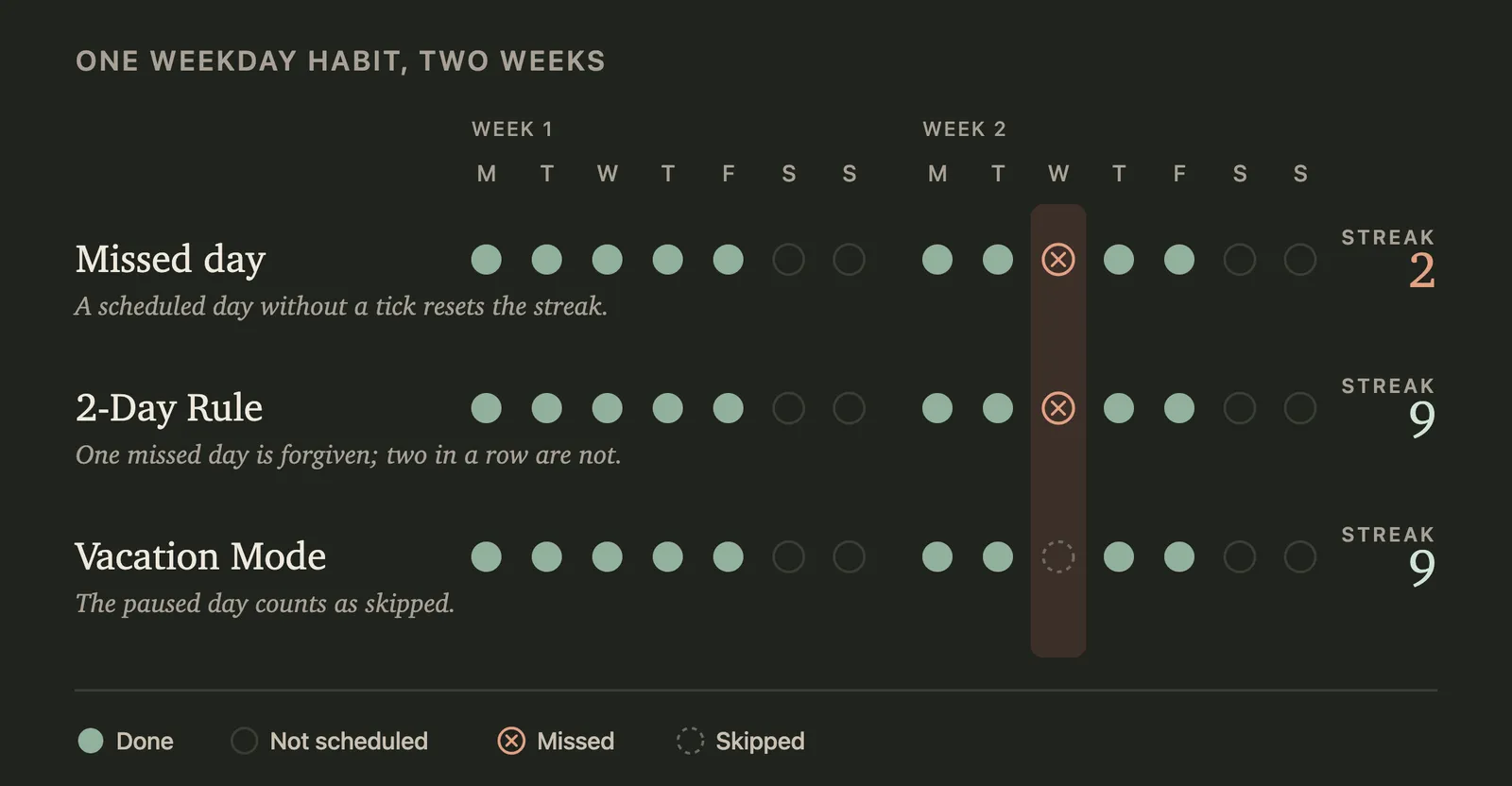
This is where habit trackers differ most, and it matters more than the icons: research by Jackie Silverman and Alixandra Barasch found that people keep going less after a broken streak than after an intact one, even when their actual behavior was the same.
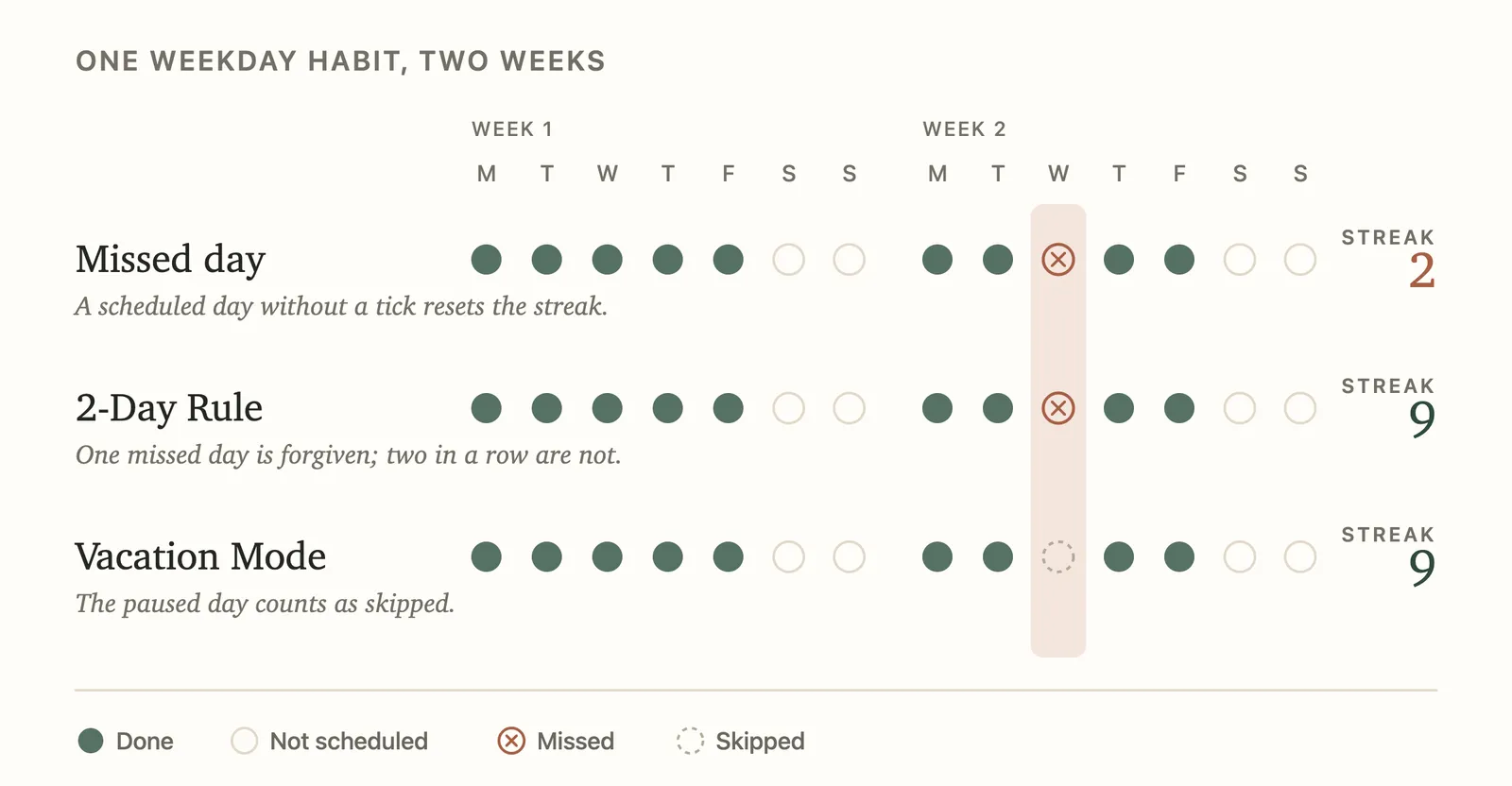
In Streaks, a scheduled day without a tick resets the streak to zero. Days the task isn’t scheduled don’t count either way, so a weekday habit isn’t broken by Saturday. Two tools soften the rule:
- The 2-Day Rule forgives a single missed day: the streak breaks only if you miss two scheduled days in a row. It works for tasks scheduled on specific days of the week.
- Vacation Mode pauses one task, a page or everything. Paused days are recorded as skipped, not missed, and the streak carries on when you’re back.
A small star next to the count means your current streak is also your best for that task.
Widgets, Apple Watch and the Mac
Streaks is at its best on the Watch. Complications and the Smart Stack show what’s left, and you can complete a task from the wrist. On the iPhone, the Tasks widget is interactive, the Dots widget shows recent history, and the Lock Screen, StandBy and Control Center all have their own controls; the Action Button can complete a task or start a timer.
The Mac app is the iPad version brought over in 2020, and it can live in the menu bar with no Dock icon. Everything syncs through iCloud, and one purchase covers every device.
Price and privacy
Streaks costs $5.99, once. There’s no subscription, no ads and no account: your data stays on your devices and in your iCloud, and the App Store privacy label lists only diagnostics. You can export everything to a CSV file or a backup, and import history from another tracker with a CSV, which makes switching in or out painless. Family Sharing covers up to six people.
What users like, and what they don’t
App Store reviews keep returning to the same points.
What they like: the clean design, Health tasks that tick themselves, the Watch app and widgets, and paying once.
What they don’t:
- The 24-task limit. It’s a design choice, meant to keep you focused, but if you track small things like vitamins, stretches and water separately, you hit it.
- Sync hiccups. Some users report completions flipping back or deleted tasks reappearing between the iPhone, iPad and Watch.
- Settings that take learning. The icon grid is simple, but setting up schedules, negative tasks and the 2-Day Rule takes a few tries.
Is Streaks worth it?
For $5.99, yes, if all of these are true: you use an iPhone, you’d like your Apple Watch and the Health app to do the tracking, and your habits fit in 24 slots. It’s polished, private and cheaper than one month of most subscription trackers.
It’s not the right pick if:
- you use Android, Windows or a work PC. Streaks runs only on Apple devices.
- you want more than 24 habits. Habitify and TickTick have no fixed cap on their paid plans.
- you want habits next to your day. Streaks is a habit tracker and nothing else: your tasks, calendar and notes live in other apps.
- a broken streak makes you quit. Loop’s habit strength score and Finch’s gentler approach treat a bad day more kindly.
Is there a Streaks app for Android?
No. Crunchy Bagel makes Streaks only for Apple devices, and there’s no web version either. Several unrelated Android apps use “Streaks” in their names, so check the developer before you install one. On Android, the closest matches are Loop (free and open source), HabitKit, Habitify and TickTick, below.
The best Streaks alternatives
| App | Best for | Runs on | Free plan | Paid |
|---|---|---|---|---|
| Plannedo | Habits on the same page as your day, goals and journal | iPhone, Mac, web | 3 habits | $79.99 a year or $119.99 once |
| Habitify | Every platform, including Android and the web | Apple devices, Android, web | 3 habits | $49.99 a year or $119.99 once |
| HabitKit | A free year-long grid on iPhone and Android | iPhone, Android | 4 habits | Monthly, yearly or lifetime |
| Loop | Free tracking on Android | Android | Everything | Free, open source |
| TickTick | Habits inside a full task manager, everywhere | Every platform | 5 habits | $49.99 a year |
| Way of Life | Notes on why a day went well or badly | iPhone, Android | Limited | $29.99 |
| Atoms | James Clear’s approach, with daily lessons | iPhone, Apple Watch, Android | Limited | $39.99 a year |
| Finch | A gentle start, if broken streaks put you off | iPhone, iPad, Android | Core features | Optional Plus |
1. Plannedo: habits next to your day
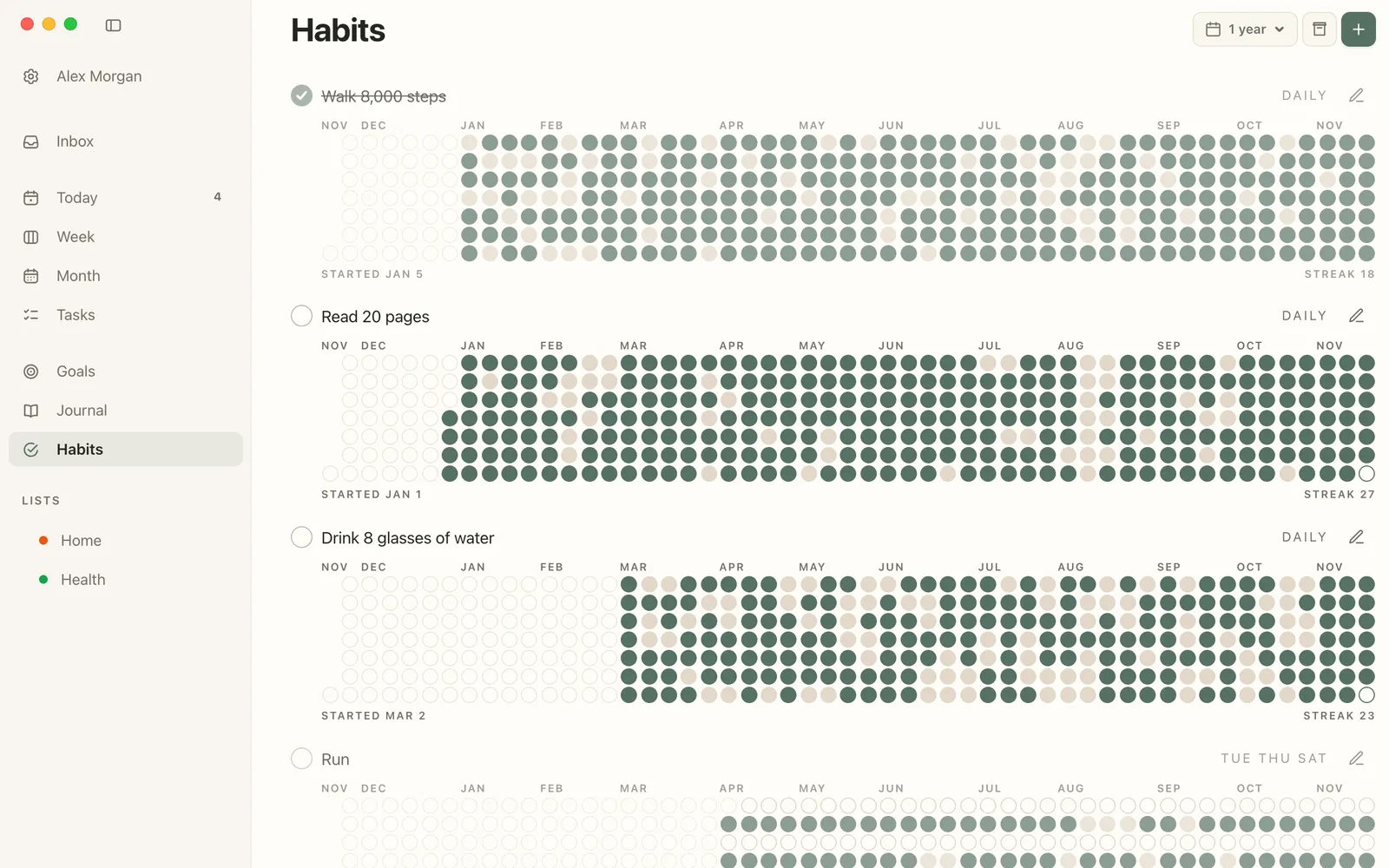
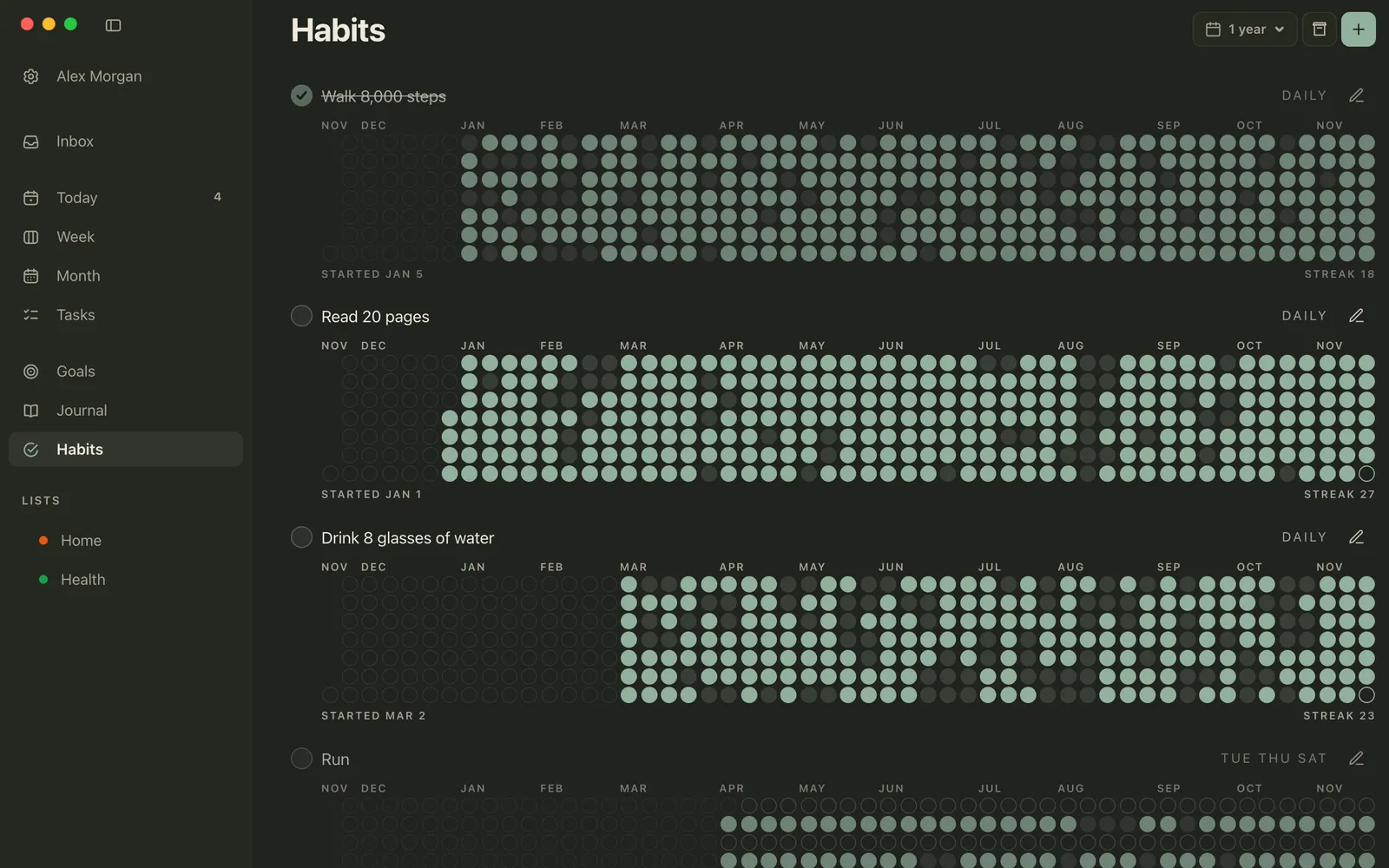
Streaks keeps your habits in a world of their own. In Plannedo, they live on the same page as the day: your tasks, your habits with their streaks, and a line about how the day went. A habit can also belong to a goal, so “Run on Tuesdays, Thursdays and Saturdays” sits under “Run a 10K in March”, and ticking it marks the goal as moved for the day.
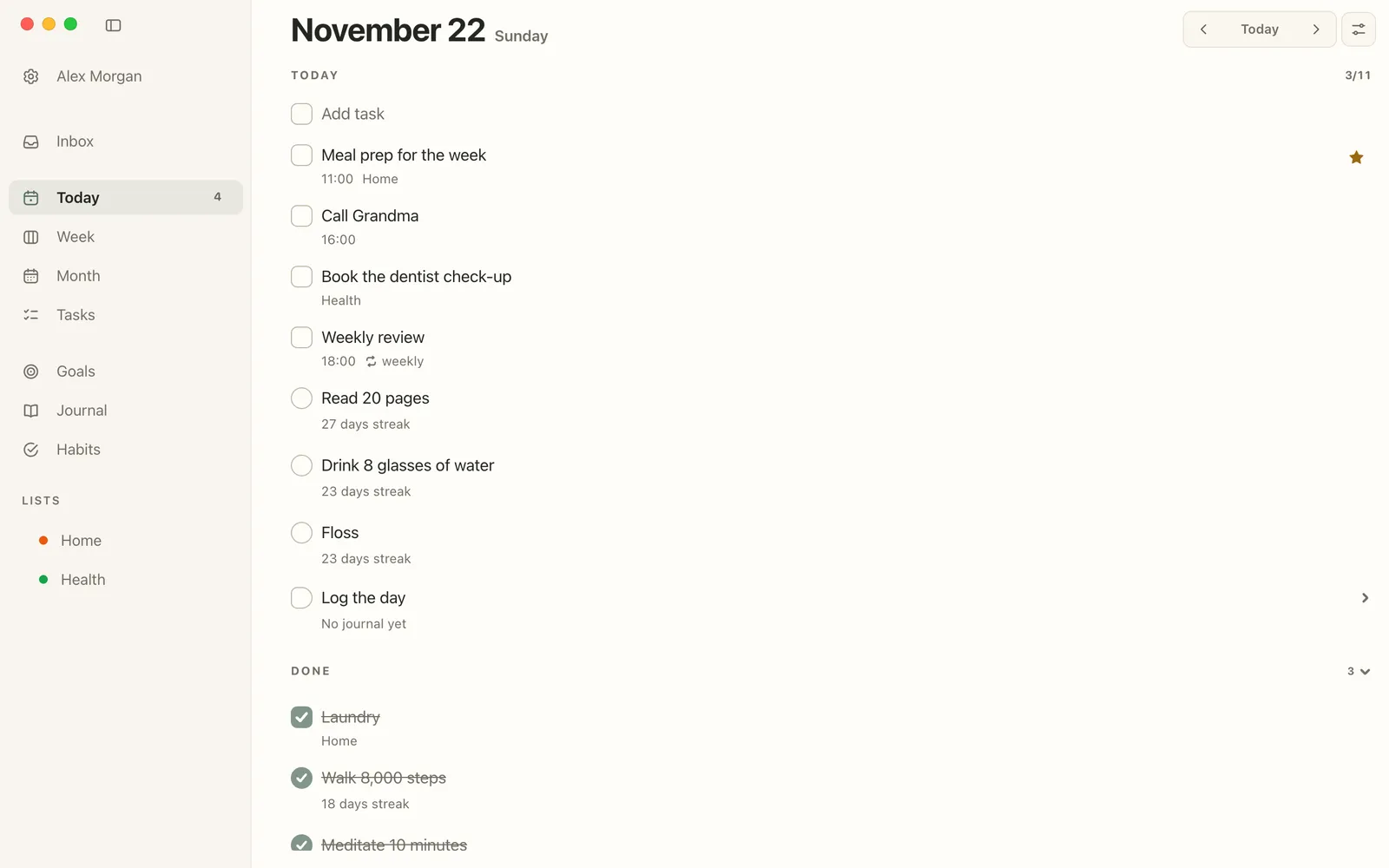
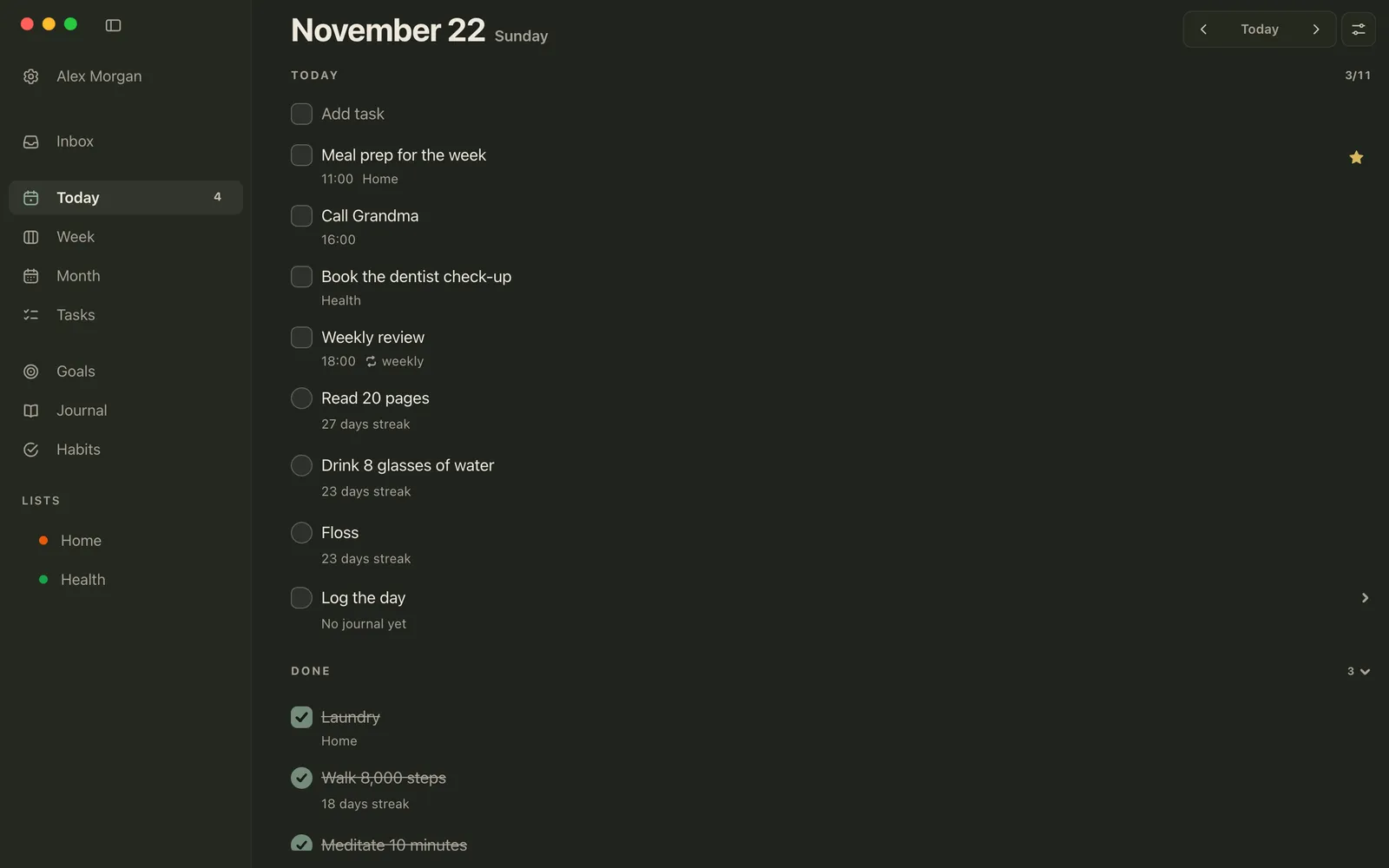
How habits work in Plannedo:
- Schedules: daily, weekdays, weekends or the exact days you pick.
- Streaks: days off the schedule never break a streak, and ticking a habit on a day it wasn’t due still adds one.
- History: dots for four weeks, three months or a whole year. Forgot to tick yesterday? Tap the day and fix it.
- Where you tick: on Today, the Habits page, Week and Month, and the widgets on your iPhone Home Screen and Mac desktop, free on every plan.
- Where it runs: iPhone, Mac and any browser, so a Windows laptop at work sees the same habits.
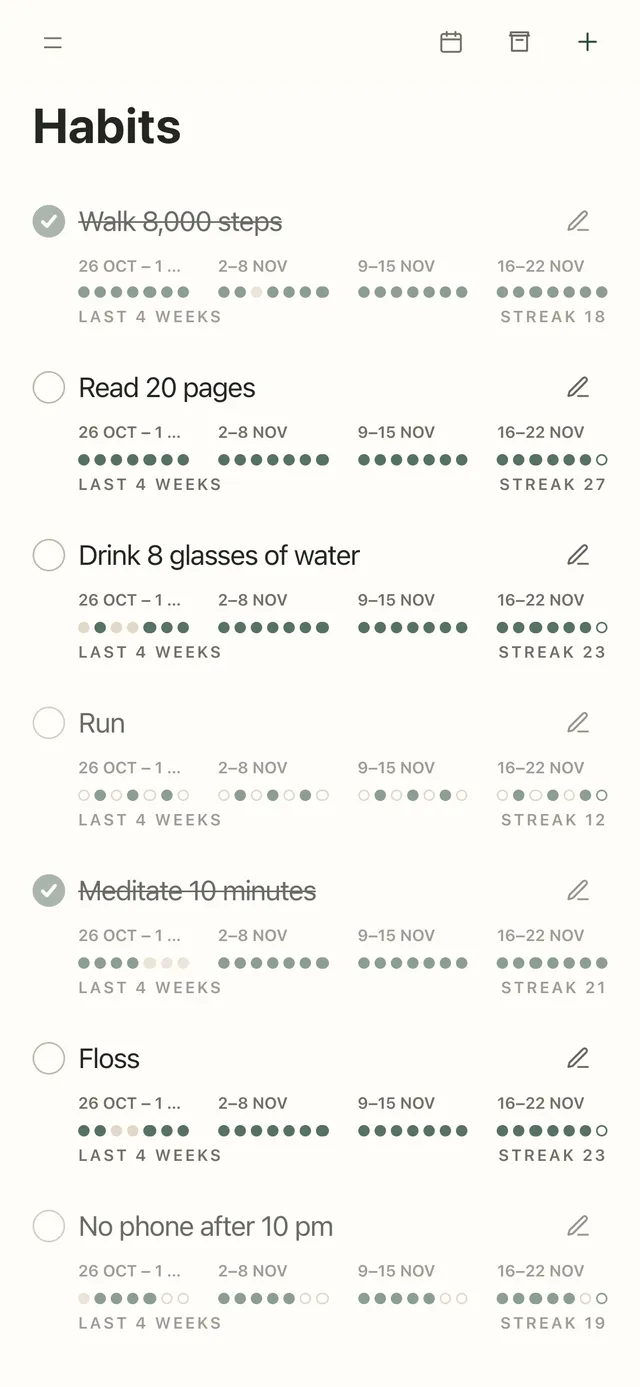
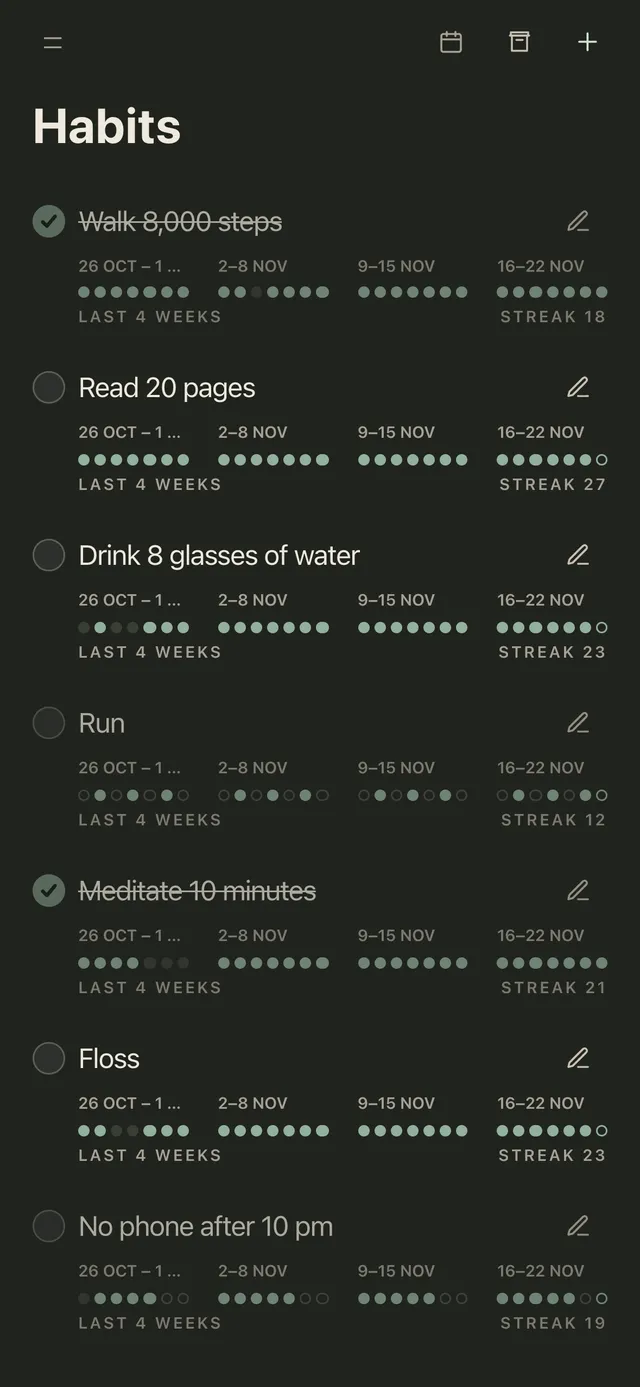
Price: the free plan has 3 habits, unlimited tasks, 3 lists, one goal and a journal every day. Pro lifts the limits and adds reminders: $7.99 a month, $79.99 a year or $119.99 once in the App Store ($79 a year on the website), one purchase for the iPhone, the Mac and the web. See Free and Pro and Habits and streaks.
Pick Streaks instead if you want Apple Health and your Watch to tick habits automatically and you don’t need your habits next to your tasks.
2. Habitify: every platform
Habitify runs on iPhone, iPad, Mac, Apple Watch, Android and the web, so it follows you from an iPhone to an Android tablet to a Windows PC’s browser. It has Skip and Off Mode for missed days, charts and a heatmap, and connects to Zapier and IFTTT. Since April 2026 the free plan allows 3 habits. Plus is $29.99 a year; Pro, which adds Apple Health sync, is $8.99 a month, $49.99 a year or $119.99 once.
3. HabitKit: a free grid on iPhone and Android
HabitKit draws each habit as a year-long grid of small tiles, like a contribution chart. It works offline without an account, runs on iPhone and Android, and sells a lifetime license as well as monthly and yearly plans. The free version covers 4 habits.
4. Loop: free on Android
Loop is free, open source and has no account and no ads. Instead of resetting to zero, it shows a “habit strength” score that drops gradually when you miss a day, which is kinder after a bad week. It’s Android only, with no sync between devices.
5. TickTick: habits inside a task manager
If you want one app for tasks and habits on every platform, including Windows and Linux, TickTick does both, plus a calendar and a focus timer. Habits are a smaller part of the app than in Streaks. Free covers 5 habits; Premium is $49.99 a year.
6. Way of Life: notes on the why
Way of Life marks each day green, red or skipped and lets you add a note about what helped or got in the way, then shows long-term trends. It runs on iPhone and Android, and Premium is $29.99.
7. Atoms: James Clear’s app
Built by the author of Atomic Habits, Atoms pairs tracking with short daily lessons and frames each habit around the person you want to become. It runs on iPhone, Apple Watch and Android; Pro is $4.99 a month or $39.99 a year. Our Atomic Habits summary covers the ideas behind it.
8. Finch: if streaks stress you out
Finch is a self-care app where you look after a small bird that grows as you complete gentle daily goals, with mood check-ins and journaling. It’s not a precise tracker, but it’s free, and for people who abandon trackers after one missed day, it can be the one that sticks.
Also worth knowing: Do Habits (the app formerly called Done) runs on iPhone and Apple Watch, handles goals repeated several times a day, and can complete habits from Apple Health. For a wider comparison of ten trackers, see our guide to the best habit tracker apps.
How to switch from Streaks
- Export your data from Streaks as a CSV, so your history isn’t lost even if the new app can’t import it.
- Keep only the habits you still do. Moving apps is a good moment to drop the ones you’ve been skipping for a month.
- Recreate each habit with its schedule in the new app: specific days, or every day.
- Write the cue into the name: “Read 20 pages after dinner” works better than “Read”, whichever app you use. Our list of habit tracker ideas has examples.
- Run both for a week, so nothing slips while you get used to the new one.
FAQ
Is the Streaks app free?
No. Streaks costs $5.99 once in the App Store, with no subscription, no ads and no in-app purchases, and one purchase covers your iPhone, iPad, Mac, Apple Watch and Vision Pro. Family Sharing lets up to six people use it.
Is Streaks on Android?
No. Streaks is made only for Apple devices, and there’s no web version. On Android, Loop is a free alternative, and HabitKit, Habitify and TickTick run on both Android and iPhone.
How many habits can you track in Streaks?
Up to 24, on four pages of six. The limit is deliberate, to keep you focused on a few habits at a time. Habitify and TickTick have no fixed cap on their paid plans.
Does Streaks work with Apple Health?
Yes, and it’s its standout feature. A Health task completes itself when Apple Health records the data, from more than 80 kinds: steps, workouts, Activity rings, sleep, water, mindful minutes, toothbrushing, medications and more, plus Screen Time.
What happens if you miss a day in Streaks?
A scheduled day without a tick resets the streak to zero; days the task isn’t scheduled don’t count. The 2-Day Rule forgives a single missed day, and Vacation Mode pauses tasks so the days count as skipped instead of missed.
Does Streaks sync between iPhone and Mac?
Yes, through iCloud, with no account to create. The Mac app is included in the same $5.99 purchase. Some users report occasional sync hiccups between devices.
What is the best alternative to Streaks?
It depends on why you’re leaving. For Android and the web, Habitify. For a free tracker on Android, Loop. For habits on the same page as your day’s tasks, goals and journal, Plannedo. For habits inside a full task manager on every platform, TickTick.
Sources
Streaks, checked November 22, 2026:
- Streaks, support and FAQ, press and release notes
- Help: negative tasks, task frequency, Automatic Times, Vacation Mode, the 2-Day Rule, widgets, exporting data
- Tracking habits automatically with Apple Health, Streaks guide
- Streaks in the App Store and Apple’s story on Crunchy Bagel
- Developer Crunchy Bagel releases a Mac Catalyst version of Streaks, MacStories, 2020
Alternatives, checked November 22, 2026:
- Habitify: App Store, new tiered pricing
- HabitKit, Loop Habit Tracker, TickTick Premium, Way of Life, Atoms, Finch, Do Habits
Research:
- Silverman, J., & Barasch, A. (2022). On or off track: How (broken) streaks affect consumer decisions. Journal of Consumer Research, 49(6), 1095-1117.
Image credits
The Streaks icon on the cover comes from Crunchy Bagel’s press kit, and Streaks is Crunchy Bagel’s trademark. We’re not affiliated with Crunchy Bagel; we use and review the app like anyone else.