Goals
The evening check-in
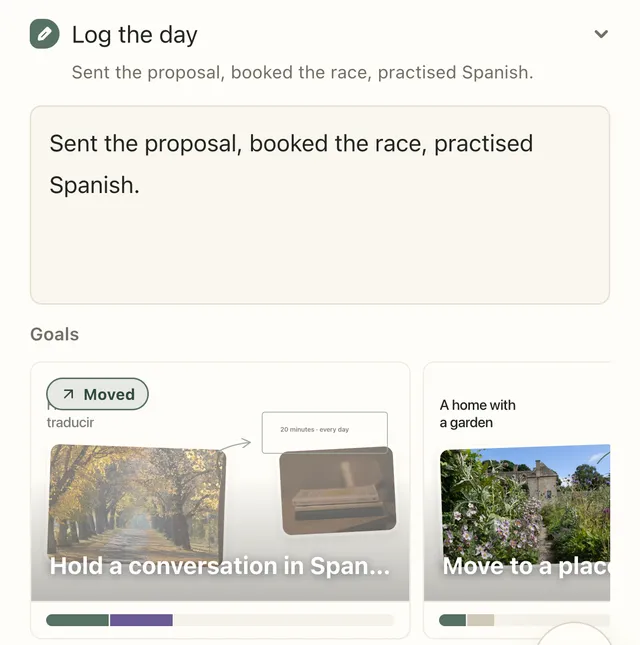
Close the day in Log the day — a line about how it went, then one tap per goal: Moved, Thought or Not today.
At the end of the day, Plannedo asks one question about each of your goals: did today move it? It’s the one moment when the goal and the day you actually lived are on the same screen, and it takes about thirty seconds.
The check-in lives in Log the day, near the bottom of Today.
Close the day
Section titled “Close the day”- Tap Log the day to open it.
- Write a line or two in Write a short reflection… — what happened, what worked, what you’d repeat. It saves by itself as you type.
- Under Goals, tap a goal’s card and choose an answer.
Once the parts you use are filled in, Log the day gets a tick and moves into Done.
The three answers
Section titled “The three answers”| Answer | When to pick it |
|---|---|
| Moved | You did something today that brought the goal closer, however small. |
| Thought | You didn’t act, but you thought about it, planned or decided something. |
| Not today | You consciously left it for today. That’s an answer too, not a failure. |
Tap the same answer again to clear it. Each goal gets one answer per day, and you can change it whenever you like.
When the answer is already there
Section titled “When the answer is already there”- If you finished a task or habit linked to the goal, the goal is already marked Moved — see Connect tasks and habits to a goal.
- If something linked to the goal is on the day’s list, its card shows a dashed Moved? button. One tap records Moved.
Skipping an evening
Section titled “Skipping an evening”Nothing happens if you skip a night. There’s no streak for goals, no score and nothing reminding you of what you missed — the day just stays empty in the goal’s history. You can also open an earlier day on Today and answer it later.
If you’d like a nudge, Pro has an evening reminder that opens Today at the time you choose.
Only want one part?
Section titled “Only want one part?”In Today sheet settings, turn off Journal to keep just the goal answers, or Goals to keep just the writing. Both parts write to the same entry as the Journal page.
Your answers add up to the record under each goal board: See which goals are moving.